


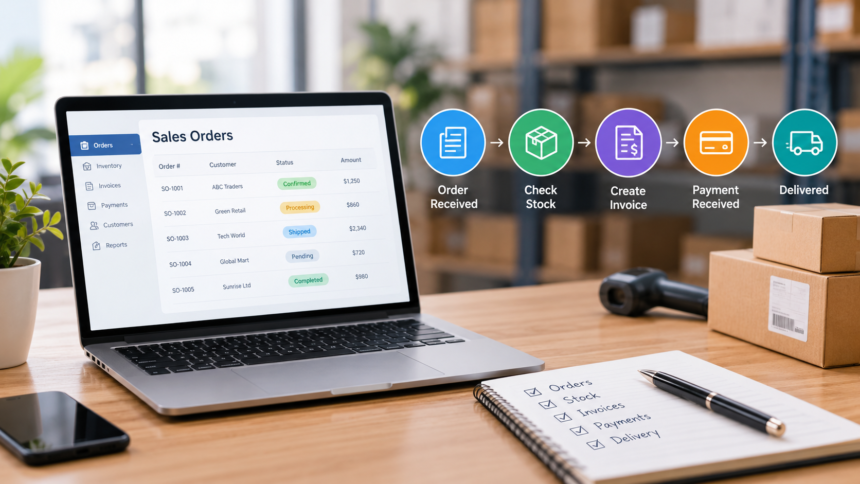
A customer places an order for 20 products. The sales team notes it in a register. The storekeeper checks stock in a separate sheet. The accounts team prepares an invoice later. When the customer calls to ask about delivery, nobody has a clear answer. This is a common problem for a growing small business.
Sales work becomes difficult when orders, stock, invoices, payments, and delivery details sit in different places. Staff spend time searching for updates. They may enter the same information twice or miss an important change. A simple order can turn into several phone calls and corrections.
Sales order management helps a business follow each customer order from the first request to final delivery and payment. A cloud-based sales management system can keep key records together and make responsibilities clearer. Software alone cannot solve every process problem, but a well-organized system can reduce repeated work and make daily sales easier to manage.
1. Why sales order management becomes difficult
In a small shop, one person may handle customer orders, billing, and delivery. As the business grows, different people take over these tasks. This creates new questions: Who confirmed the order? Is the product available? Has the invoice been sent? Did the customer pay? Has the delivery team completed the shipment?
Consider a wholesale mobile accessories business. A customer orders 50 charging cables and 30 phone cases. The salesperson writes the request in a notebook, but the storekeeper only has 40 cables available. If the sales and stock teams do not share the same record, the business may promise delivery of products it cannot supply on time.
Similar problems arise when a customer changes a quantity, asks for a discount, or makes a partial payment. Without a clear record of the changes, two staff members may give different answers. A useful sales process should show the current status of each order and who must act next.
2. Problems with manual order and payment tracking
Paper registers and spreadsheets are familiar and inexpensive, so many small businesses start with them. They can work for a small number of orders if employees update them carefully. Problems appear when records are spread across devices or saved in different versions.
One employee may update an invoice sheet while another checks an older copy. A payment might arrive in the bank but remain marked as unpaid in the sales register. A delivery may be completed without anyone updating the customer record. These issues do not always mean staff made a serious mistake. Often, the process simply has too many separate steps.
Manual tracking also makes it harder to answer basic questions quickly. Which orders are pending today? Which invoices are overdue? What items were returned? A manager may need to collect answers from several people before making a decision.
The first improvement is to define a single place for each type of record. Every order should have an order number, customer name, products, quantities, price, date, and status. Payments and delivery updates should connect to that order whenever possible.
3. What SaaS sales management software does
Software as a service, or SaaS, means that a business uses software provided over the internet, usually through a subscription. Employees can access the system using approved accounts and supported devices. The software provider normally manages the hosted application and updates, while the business remains responsible for its users, information, and operating procedures.
A sales management system may support quotations, customer orders, invoices, payment records, and reports. Features differ between products, so owners should check what is actually included before choosing a service.
A typical workflow starts when a salesperson creates a quotation or enters an order. The team confirms the product details and available stock. After approval, the business prepares the invoice and records payment. Delivery staff update the shipment or handover status. Managers then review open orders and pending collections.
The main advantage is shared visibility. Instead of asking several people for the latest copy of a spreadsheet, an authorized employee can check the same order record. This only works when staff enter accurate information and update each step on time.
4. Organizing customer orders from start to finish
A clear order process begins before the invoice is created. Sales staff should confirm the customer’s details, products, quantities, agreed price, and expected delivery date. If there are taxes, shipping charges, or special terms, record them before requesting approval.
Give every order a unique number. This helps employees find the right record when a customer calls. Use a small set of status labels, such as New, Confirmed, Partially Fulfilled, Dispatched, Completed, or Cancelled. The exact labels can vary, but everyone should understand what each one means.
For example, a hardware supplier receives an order for 100 paint buckets. The store has only 70. The salesperson should record whether the customer accepts a partial delivery or prefers to wait. The order record should explain what is still pending. When more stock arrives, the team can act without reopening the entire conversation.
If a customer asks to change an order, save the change with a date and responsible employee. This helps prevent disputes about quantity and price. For higher-value orders, a manager may need to approve discounts or amendments before billing.
5. Connecting invoices with orders
Preparing an invoice should be a controlled step, not a fresh round of manual data entry. When software supports converting approved order details into an invoice, staff can reuse the correct customer and product information. They should still verify tax details, address, prices, and the final amount.
An invoice number should be easy to trace back to the original order. This becomes useful when a customer requests a copy, returns an item, or asks why the billed amount changed. Businesses should also record credit notes or adjustments according to their accounting process.
For Indian businesses, invoice details and tax treatment need to follow the rules applicable to the seller and transaction. A software feature should not be treated as a substitute for professional tax advice. Owners should check their current compliance needs with their accountant and confirm that the selected system supports them.
6. Tracking pending payments without confusion
A completed sale does not always mean the business has received the money. Some customers pay immediately, while others pay after delivery or within an agreed credit period. A simple payment tracking process should show the invoice amount, amount received, outstanding balance, due date, and last follow-up.
Imagine that a customer owes ₹18,000 on an invoice and pays ₹10,000. The record should show the remaining ₹8,000 instead of marking the invoice as fully paid or leaving the original balance unchanged. If payment happens in two installments, each receipt should be linked to the invoice.
Managers can review an overdue-invoice list at a set time each week. Staff should follow up politely with the customer and record the outcome. If the customer reports a delivery issue, the team should resolve that issue rather than sending the same payment reminder again and again.
Clear payment records help businesses understand expected cash collections. They also reduce repeated calls caused by unclear balances.
7. Keeping deliveries and stock updates connected
Order management and delivery management work best when staff can see what was promised and what was actually supplied. Before confirming delivery, check product availability and the delivery address. Record partial shipments, returns, and damaged items clearly.
For a retail distributor, even a simple status field can help. An order might be Confirmed on Monday, Packed on Tuesday, and Delivered on Wednesday. If delivery is delayed, the responsible employee should update the record and tell the customer.
Sales software may connect to inventory or delivery tools, but this depends on the product and plan. If the systems are separate, define a clear handover procedure. For example, the storekeeper confirms the packed quantity before the invoice or dispatch note is finalized.
Daily reconciliation is also useful. Compare orders confirmed, items dispatched, and deliveries completed. Investigate differences while the details are still fresh.
8. Reports small business owners should review
Business owners do not need dozens of charts to control daily sales. A few reliable reports can answer the most important questions.
An open-order report shows what still needs attention. An unpaid-invoice report helps the accounts team plan collections. A product-sales report shows which items customers purchase most often. A sales-by-customer report can help managers understand repeat business. A return or cancellation report may reveal problems with product quality, order accuracy, or delivery promises.
Reports should be reviewed at regular intervals. A short daily review can focus on new orders, delayed deliveries, and urgent customer requests. A weekly review can cover outstanding payments, cancelled orders, and unusual changes. Monthly reporting can help owners compare sales and plan purchasing decisions.
Remember that reports are only as dependable as the records behind them. Assign responsibility for updating data, reviewing errors, and correcting entries with a clear record of the change.
9. Features to check before choosing software
Start with the actual sales process instead of choosing software from a long feature list. A ten-person retailer and a regional distributor may have different needs.
Check whether the product supports the documents your team uses, such as quotations, sales orders, invoices, credit notes, and payment receipts. Confirm whether employees can track partial payments, order changes, and overdue invoices. Ask if customer records can be searched using a phone number, invoice number, or order number.
User permissions matter too. Cashiers, sales employees, storekeepers, and managers do not always need the same access. Check whether the system provides separate roles, approval controls, and a history of important changes. Ask about data export, backups, mobile access, support, and how to recover records if a subscription ends.
Also check how pricing works. A low starting price may not include every required feature or enough user accounts. Request a demo using three real examples from your business: a normal order, a partial payment, and an order change after confirmation. This is more useful than watching only a general product tour.
10. A practical way to introduce a new sales process
Changing software and staff habits at the same time can be difficult. Begin by documenting the current process. Follow one customer order and write down every step from enquiry to payment. Mark where employees copy information, wait for approval, or search for missing details.
Next, choose standard fields and status names. Decide who creates orders, who approves discounts, who confirms stock, and who updates payments. Create a short checklist for staff so that records are entered in the same way.
Test the process with a small set of orders first. Compare the new records with invoices, delivery notes, and receipts. Correct mistakes before moving more work into the system. Train employees on both daily tasks and what to do when a customer changes an order.
Once the process is working, review a few orders every week. Look for missing information, delayed updates, and repeated corrections. A simple review routine can prevent small problems from becoming regular habits.
11. Comparing real software options
Small businesses comparing tools can review sales management software from TAZK as one example of a product designed to support business sales activities. Before selecting any service, owners should check the available features, integrations, user permissions, pricing, and fit for their own workflow through a current product demonstration.
This example is provided for context. The right choice depends on the business’s order volume, payment terms, stock process, and reporting requirements.
Common questions
Can a small business use SaaS sales software without an IT team?
Often, yes. Many hosted products are designed for everyday business users. The owner should still confirm setup support, employee training, account permissions, and data export options.
Will software automatically prevent every sales mistake?
No. Software can reduce repeated entry and make records easier to check, but incorrect product information, missed updates, and weak approval processes can still cause errors.
What should a business track first?
Start with customer orders, order status, invoices, payments received, outstanding balances, and delivery status. Add more detail only when the team can maintain it consistently.
Is cloud-based software the same as accounting software?
Not necessarily. Sales management focuses on orders and related sales activity. Accounting software handles broader financial records. Some products combine these functions or connect with other systems.
Final thoughts
Good sales order management begins with clear information and assigned responsibilities. Businesses should know what customers ordered, what can be delivered, what has been invoiced, and what remains unpaid. Paper records or spreadsheets can support this at a small scale, but growth makes shared, updated records more important.
A suitable SaaS system can help a team manage daily orders, invoices, deliveries, and payments from a common process. The best results come when businesses combine useful software with accurate entries, regular reviews, and simple staff training.