


An AI content audit is a review of every post on your site where an AI model reads each page, scores it against Google’s helpful content questions, and sorts it into one of five actions: keep, update, merge, redirect or remove. You feed it the traffic data. It does the reading. You make the final call.
Key takeaways
- Start with data, not the AI. Pull clicks, impressions and backlinks for every URL first.
- Give the AI a fixed scoring rubric so every post is judged the same way.
- Updating and merging fix most problems. Deleting is the last option.
- Check the AI’s calls by hand before you change anything on the live site.
Why your old posts need a content audit
Most published content gets no search traffic at all. Ahrefs looked at roughly 14 billion pages in its Content Explorer index and found that 96.55% of them get zero traffic from Google, with another 1.94% getting between one and ten visits a month.

If your blog has a few hundred posts, a large share of them are probably sitting in that 96%. They still cost you something. They split topical focus, compete with your better pages for the same queries, and give crawlers more thin pages to wade through.
That does not mean you should bulk delete. Google’s own advice on recovering from core updates says deleting content is a last resort, only for pages that cannot be saved. Rewriting or restructuring comes first.

That is where AI helps. Reading 300 posts and judging each one fairly takes a person weeks. An AI model can do the first pass in an afternoon, as long as you give it the right data and a clear rubric.
What you need before you start
The AI cannot see your traffic, your links or your business goals. You have to hand those over. For each URL, collect:
- Clicks and impressions for the last 12 months from the Search Console Performance report, exported by page.
- Referring domains from whatever backlink tool you use.
- Publish date and last updated date from your CMS.
- The main query each page ranks for, from the same Search Console export.
- The page text, either pasted in or pulled by a crawler.
If you do not have a crawler, DIY SEO Hub crawls up to 5,000 pages free and flags missing titles, meta issues and missing H1s. If you want Search Console data turned into a work plan, AnotherSEOGuru connects read-only to GSC and GA. And if you run audits inside Claude or ChatGPT, CrakSEO’s MCP servers feed live SEO data straight into the chat.
Step 1: Build the inventory sheet
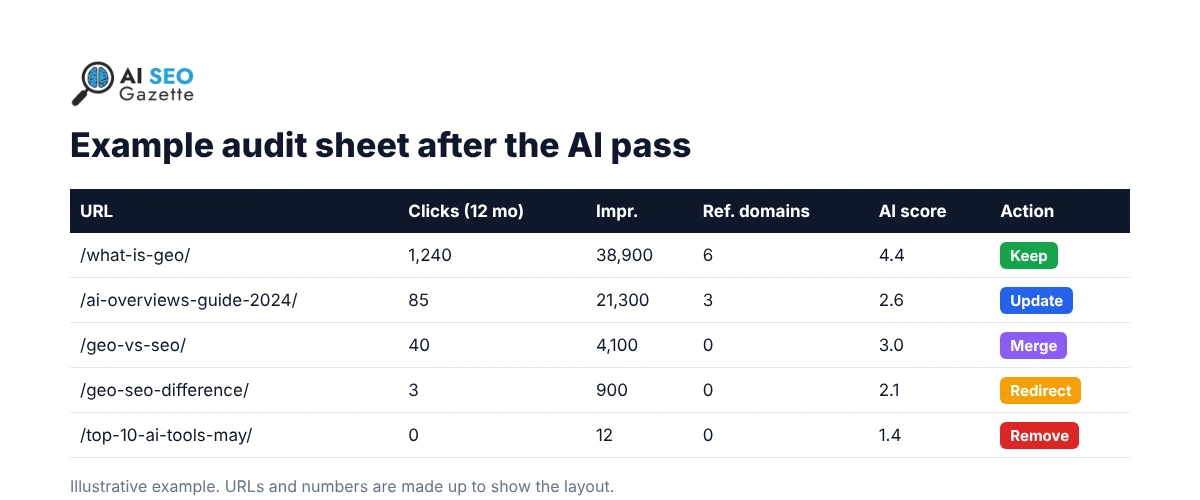
Put everything in one spreadsheet, one row per URL. Columns: URL, title, publish date, last updated, clicks, impressions, average position, main query, referring domains. Leave two empty columns at the end for the AI score and the action.
Sort by impressions, highest first. Posts with high impressions and low clicks are your quickest wins, because Google already shows them and people are not clicking.
Step 2: Score each post with an AI content analysis prompt
The mistake most people make is asking the AI “is this post good?” You get a vague, polite answer every time. Give it a rubric instead. The one below is built from Google’s own self-assessment questions for helpful content, turned into five scores.

Paste this into Claude, ChatGPT or Gemini with one post at a time, or in batches of five if the posts are short:
You are auditing a blog post for a content audit. Score it from 1 to 5 on each line below and give one sentence of reason for each score.

1. Originality: does it add first-hand testing, data or analysis that other pages on this topic do not have?
2. Accuracy: are the facts, stats, tool features and prices still correct today? List anything that looks out of date.
3. Completeness: does it fully answer the main query below, or would a reader need to search again?
4. Title honesty: does the title describe the content without exaggerating?
5. Overlap: based on the list of other URLs below, does another post on this site answer the same question?

Main query: [paste]
Clicks / impressions (12 months): [paste]
Referring domains: [paste]
Other URLs on the site on a similar topic: [paste]
Post text: [paste]

End with: average score, and one recommended action from this list only: Keep, Update, Merge, Redirect, Remove. Explain the action in two sentences.
Two details matter here. First, the overlap check only works if you paste in the other URLs, since the AI does not know your site. Second, the accuracy line is where AI earns its keep. It is good at spotting “as of 2023” statements, dead product names and prices that no longer match.
Step 3: Sort posts into five actions
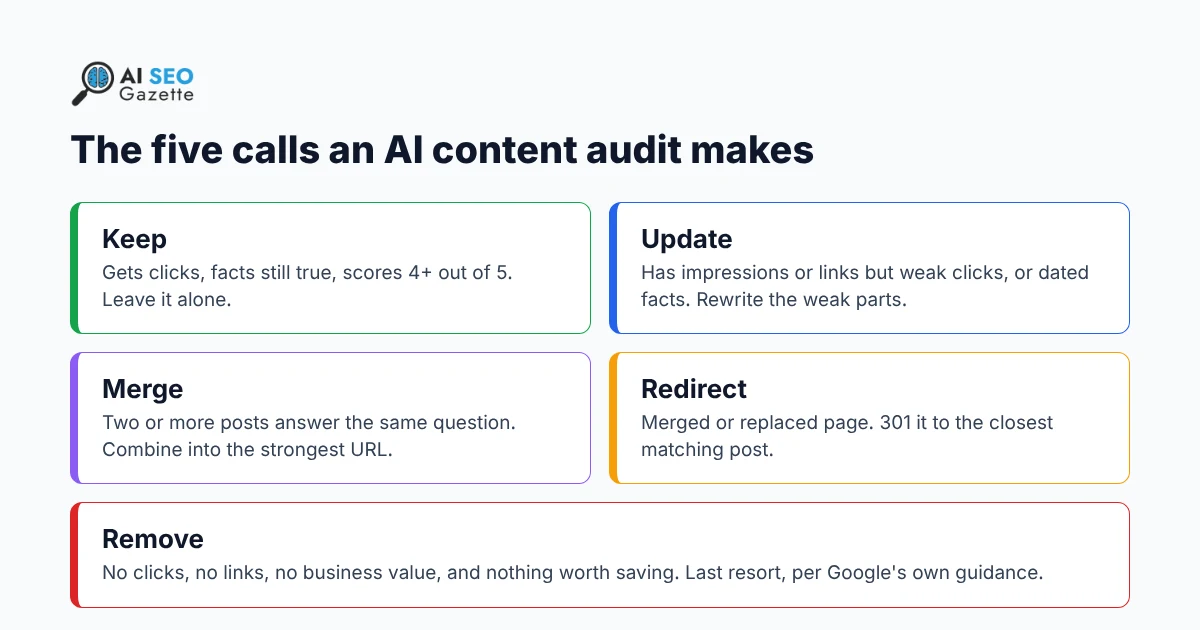
Once every row has a score, apply the same rules to every post. These are the thresholds we use as a starting point. Adjust them for the size of your site.
| Action | When to use it | What you do |
|---|---|---|
| Keep | Steady clicks and an AI score of 4 or above | Nothing, apart from checking internal links point to it |
| Update | High impressions but a click-through rate well under your site average, or dated facts | Rewrite the intro, fix the facts, add what is missing, change the updated date |
| Merge | Two or more posts with a high overlap score on the same query | Combine the best parts into the URL with more clicks and links |
| Redirect | The weaker URL after a merge, or a post replaced by a newer one | 301 redirect to the closest matching page |
| Remove | Zero clicks, zero referring domains, a score under 2 and no reason to exist | Delete it, or noindex it if people still use it on site |
For redirects, Google recommends a permanent server-side redirect (301 or 308) whenever a page has moved for good. That way both search engines and readers land on the right page.
Worked example: we audited one of our own posts
To test the prompt, we ran it on our own guide, Mastering GEO for AI Search Visibility, published in April 2026 and never updated since. Here is what came back, in short:
| Check | Score | Why |
|---|---|---|
| Originality | 2 | Mostly a summary of other people’s findings, no test or data of our own |
| Accuracy | 2 | Quotes figures like “30-50% more citations” and “80-90% overlap” without linking the original studies, so a reader cannot check them |
| Completeness | 3 | Covers the basics, but two sections show a stray “Embedding” placeholder where a video or graphic failed to load |
| Title honesty | 4 | The title matches what the post covers |
| Overlap | 2 | Two other posts on this site cover GEO basics for the same searcher |
Average: 2.6. Recommended action: Merge. The AI suggested folding it into our stronger GEO guide, keeping the step-by-step structure, and 301 redirecting the old URL.
We agree with the call, with one change from the manual review: before merging, we will try to trace those uncited stats back to their source. Any figure we cannot find goes, rather than getting carried into the new page. That is the kind of decision the AI flagged but could not make for us.
Step 4: Check the AI’s calls by hand
Do not push the AI’s actions live without a review. In our experience it gets three things wrong often enough to matter:
- Business value. A post with zero clicks might be the page your sales team sends to every new lead. The AI cannot know that.
- Links. If a post has even one strong referring domain, removing it throws that link away. Redirect it instead.
- Its own facts. When the AI says a stat is outdated, check the original source yourself. It sometimes “corrects” numbers that were right.
A quick rule: review every Merge, Redirect and Remove call yourself, and spot check about one in ten Keep and Update calls.
Step 5: Make the changes and track them
Work through updates first, because they carry the least risk. When you update a post, change more than the date. Google and AI search tools both pay attention to real changes, which we covered in our piece on how publication dates affect rankings and AI search visibility. If the AI helped with the rewrite, run it through the checks in our 5-step framework for editing AI content before you publish.
When you merge, fold the posts into a topic cluster where it makes sense. Our guide to building content hubs shows how to link the merged page into a wider group of posts.
Updated posts should also be easy for AI assistants to quote. Put a direct answer near the top, use clear headings, and source every number. You can check whether ChatGPT, Gemini and Perplexity can reach and cite a page with Ardexo AI Audit, and our guide on getting cited in AI Overviews and ChatGPT covers the rest.
Add a “date changed” column to your sheet and compare clicks for each URL 8 to 12 weeks later. Google notes that some changes show up in a few days, while others take several months for its systems to pick up.
A note for news sites
News posts age differently from guides. A story about a Google update from 2024 should not be “updated” with 2026 facts, because the date is the point of the story. For old news, keep the post as a record and add a line at the top linking to your newest explainer on the same topic. Save the update and merge actions for evergreen guides.
Also watch for scale. Google’s guidance on generative AI says that using AI to produce many pages without adding value for users may count as scaled content abuse. If your audit finds dozens of thin, AI-written news rewrites, that is a Merge or Remove pattern, not an Update one.
How often to run a content audit
For most blogs, a full audit once a year and a quick pass on the top 50 pages every quarter is enough. Run an extra one after a core update hits your traffic. Our breakdown of the November 2026 core update covers what changed this time.
Frequently asked questions
Can ChatGPT do a full content audit on its own?
No. ChatGPT, Claude and Gemini can read and score posts, but they cannot see your Search Console data, backlinks or business goals unless you give them that data. Use them for the reading and scoring, not for the final decision.
How long does an AI content audit take?
Collecting the data takes a few hours for most sites. Scoring with AI runs at a few minutes per post. A 200-post blog can usually get through the first pass in a day, with a second day for manual review.
Should I delete posts that get no traffic?
Not by default. Check for backlinks, internal value and search impressions first. Most zero-click posts with impressions are better updated or merged. Delete only when the post has no links, no use and nothing worth saving.
How do I audit blog content without paid tools?
Export page data from Search Console, crawl the site with a free crawler, and use the free tier of any AI chat tool with the prompt above. You can find more free options in the SEO tools directory.
Sources
- Ahrefs, Tim Soulo (2023). 96.55% of Content Gets No Traffic From Google
- Google Search Central. Google Search’s core updates
- Google Search Central. Creating helpful, reliable, people-first content
- Google Search Central. Google Search’s guidance on generative AI content on your website
- Google Search Central. Redirects and Google Search
- Google Search Console Help. Performance report (Search results)