

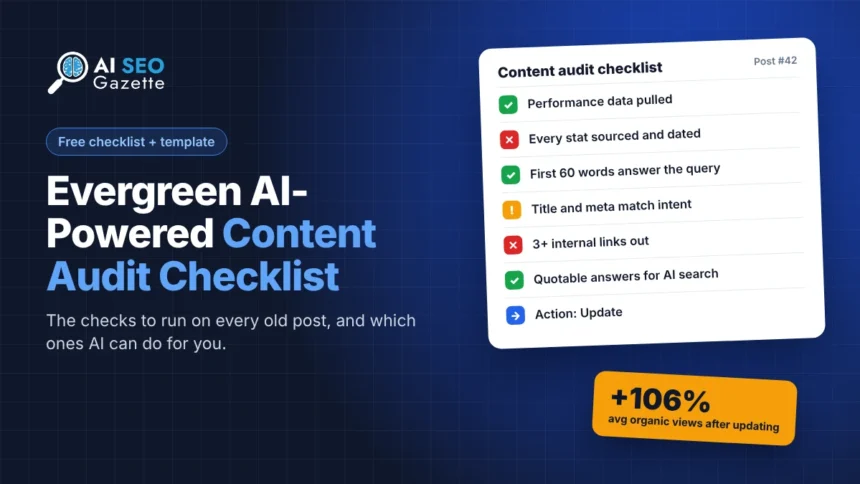
A content audit checklist is a fixed list of checks you run on every existing post: performance, accuracy, search intent, on-page SEO, links, AI search readiness and the final action. Keep it evergreen by checking things that don’t go out of date, let AI handle the reading-heavy items, and save the judgement calls for a person.
Key takeaways
- Updating old posts pays off. HubSpot reported a 106% average rise in monthly organic views on the old posts it optimized.
- An evergreen checklist checks for things, not tools or dates, so it still works next year.
- AI is good at the reading checks (dated facts, missing answers, thin sections) and poor at the business ones.
- The checklist below is free to copy, along with a ready-made template layout and a prompt.
Why a content audit checklist pays off
Old posts are where most of a blog’s traffic already lives. When HubSpot’s Pamela Vaughan analysed the HubSpot blog, she found that 76% of monthly blog views came from old posts, and that updating and republishing them raised monthly organic search views of those posts by an average of 106%. That is HubSpot’s own reported result on its own blog (the article was last updated in June 2025), so treat it as one strong case, not a promise.

The catch is consistency. Most audits fall apart because each post gets judged differently depending on who reviews it and when. A checklist fixes that. Every post goes through the same checks, in the same order, and ends with one action.
If you want the full process behind it (pulling data, scoring with AI, sorting posts into actions), start with our AI content audit guide. This article is the checklist and template you run during that process.
What makes a checklist evergreen
Most checklists age badly because they name things that change: a metric Google retired, a tool’s old feature, “this year’s” ranking factor. Three rules keep this one useful:
- Check outcomes, not tools. “Does the page load fast for real users?” survives a metric change. “Is FID under 100ms?” did not. Google replaced FID with INP in Core Web Vitals on March 12, 2024, and every checklist that named FID went stale overnight.
- Tie checks to Google’s own questions. Google’s helpful content self-assessment has stayed close to the same wording for years. Checks built on it last.
- Review the checklist once a year. Put a date on it and remove any item nobody has acted on in 12 months.
The SEO content audit checklist
Run these checks on each post. The “Who” column says whether AI can do the check or whether it needs a person.

1. Performance
| Check | Who |
|---|---|
| Clicks and impressions for the last 12 months, compared with the 12 months before | Data export |
| Main query the page ranks for, and its average position | Data export |
| Click-through rate compared with your site average | Data export |
| Referring domains pointing at the page | Data export |
| Conversions or sign-ups the page drives, if you track them | Person |
2. Accuracy and freshness
| Check | Who |
|---|---|
| Every stat has a linked original source and a year | AI flags, person verifies |
| No retired metrics, products, features or prices | AI |
| Screenshots still match the current interface | Person |
| Visible “Last updated” date that matches the date in your markup | Person |
3. Search intent and depth
| Check | Who |
|---|---|
| The first 60 words answer the main query directly | AI |
| The page answers what the current top results answer, plus something they don’t | AI with a SERP check |
| It has first-hand experience: a test, an example, real numbers | AI flags, person adds |
| No other post on your site targets the same query | AI with your URL list |
4. On-page SEO
| Check | Who |
|---|---|
| Title and meta description match the query and read naturally | AI |
| One H1, logical H2s, no skipped heading levels | Crawler |
| Images have descriptive alt text | Crawler |
| No broken embeds, placeholder text or layout leftovers | Crawler plus a quick look |
5. Links
| Check | Who |
|---|---|
| At least 3 internal links out to related posts | Crawler |
| At least 2 other posts link in to this one | Crawler |
| No broken or redirected outbound links | Crawler |
6. AI search readiness
| Check | Who |
|---|---|
| Short, quotable answers under clear question-style headings | AI |
| AI crawlers are not blocked from the page | Tool check |
| Named sources and specific numbers that an AI answer can cite | AI |
7. Decision
| Check | Who |
|---|---|
| One action: keep, update, merge, redirect or remove | AI suggests, person decides |
| Owner and due date for the action | Person |
Free tools cover most of the crawler checks. DIY SEO Hub crawls up to 5,000 pages with no signup and flags heading, title and meta issues. SiteScope runs 18+ checks, including AI crawler access and llms.txt. For the AI search checks, Ardexo AI Audit shows whether ChatGPT, Gemini and Perplexity can reach and cite a page.
The content audit template
Turn the checklist into a sheet with one row per URL. These columns cover everything above without getting unwieldy:
| Column | What goes in it |
|---|---|
| URL, title, publish date, last updated | From your CMS or sitemap |
| Clicks, impressions, CTR, position, main query | From the Search Console Performance report, by page |
| Referring domains | From your backlink tool |
| Accuracy, intent, on-page, links, AI readiness | Pass or fail for each section of the checklist |
| Notes | What failed, in one line |
| Action, owner, due date, date done | The decision and who does it |
| Clicks 90 days after | Filled in later, so you can see what worked |
If you would rather have Search Console data turned into a work plan automatically, AnotherSEOGuru connects read-only to GSC and GA.
The AI prompt for the reading checks
Paste this into Claude, ChatGPT or Gemini with one post at a time. It covers the checklist items marked “AI” and returns them in the same order as your sheet.
Audit this blog post against the checklist below. For each item answer PASS or FAIL and give a one-line reason. Quote the exact sentence when something fails.

Accuracy: list every stat without a linked source or a year. List any metric, product, feature or price that may be retired or out of date.
Intent: does the first 60 words answer the main query? What does the post fail to answer that a searcher would expect?
Experience: does it include a first-hand test, example or real numbers? Yes or no.
Overlap: does it answer the same question as any URL in the list below?
On-page: is the title honest and specific? Any placeholder text, broken embed or leftover formatting?
AI readiness: are there short, quotable answers under clear headings? Are numbers tied to named sources?

Main query: [paste]
Other URLs on the site on similar topics: [paste]
Post text: [paste]

Finish with the three fixes that would help this post most, in order.
Two warnings from running this on real posts. AI will sometimes call a correct stat “outdated” because it has seen a newer number elsewhere, so check the source before changing anything. And it cannot judge business value, so a post with zero clicks that your sales team relies on still needs a person’s call. Our framework for editing AI content covers the review step in more detail.
Worked example: the checklist on one of our own posts
We ran the checklist on our post 5 ChatGPT Prompts for Technical SEO Audits, published in December 2025 and not updated since. Here is what it found:
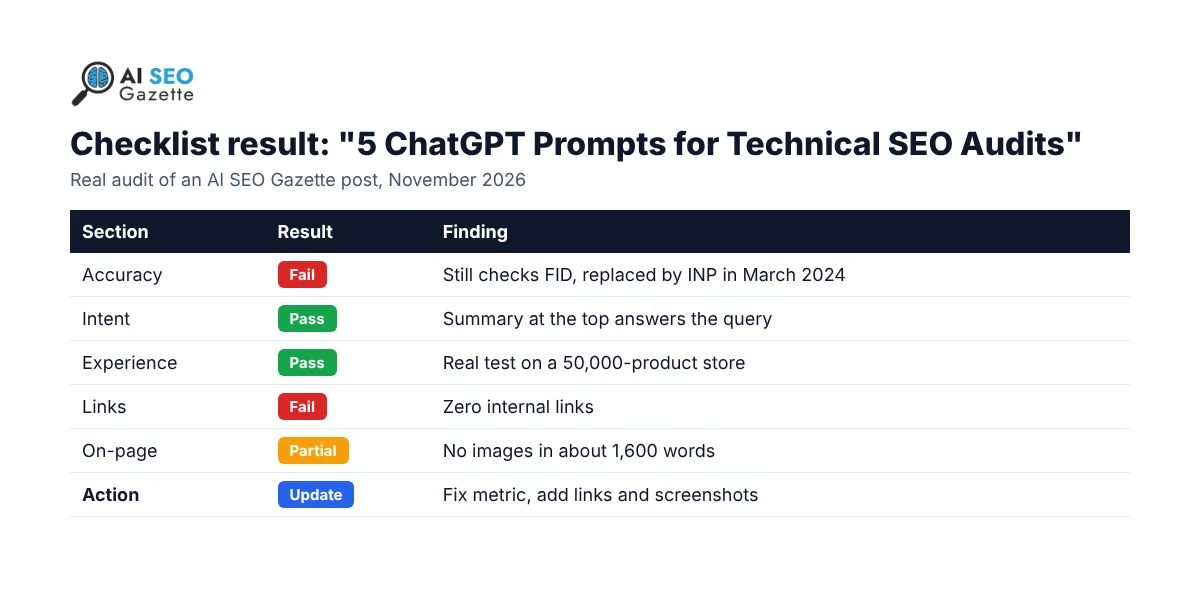
- Accuracy: fail. The Core Web Vitals prompt still checks FID, which Google replaced with INP in March 2024. The pricing and model names in the intro (“ChatGPT Plus ($20/month) or GPT-4”) are also likely out of date.
- Intent: pass. The “Don’t have time? Read this” summary at the top answers the query straight away.
- Experience: pass. It includes a real test on a 50,000-product ecommerce site.
- Links: fail. The post has zero internal links, so it sends no readers or authority to related guides.
- On-page: partial. No images at all in about 1,600 words.
Action: Update. Swap FID for INP in the prompt, refresh the tool and pricing lines, add internal links to related guides and our tools directory, add one or two screenshots, then change the visible updated date. Google’s guidance is to label it clearly as “Last updated” and keep the visible date and the date in your markup the same.
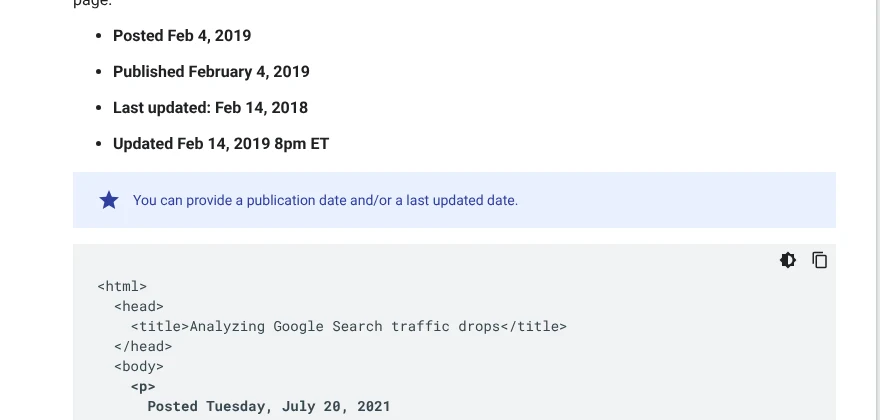
For more on how update dates affect rankings, see our piece on content freshness and publication dates.
How to keep the checklist running
- Top 50 pages: every quarter.
- Whole site: once a year, or after a core update hits your traffic.
- New posts: run the checklist once, 90 days after publishing, when you have real data.
- The checklist itself: once a year. Remove dead items and add anything new that you found yourself checking by hand.
Updated posts also do better inside topic clusters. Our guide to building content hubs shows how to link them together, and getting cited in AI Overviews and ChatGPT covers the AI search side.
Frequently asked questions
What should a content audit checklist include?
Performance data, accuracy and freshness, search intent and depth, on-page SEO, internal and external links, AI search readiness, and a final action for each post. Everything else is optional.
What is the difference between a content audit checklist and a content audit template?
The checklist is the list of things you check on each post. The template is the sheet where you record the results, one row per URL, with the action and who owns it.
How often should I run an SEO content audit?
Your top 50 pages every quarter and the whole site once a year. Run an extra audit after a core update causes a clear traffic drop.
Can AI run the whole checklist?
No. AI handles the reading checks well, like spotting dated facts or missing answers. Performance data has to come from Search Console and your backlink tool, and the final keep, update or remove decision needs a person.
Sources
- HubSpot, Pamela Vaughan (updated 2025). The Blogging Tactic No One Is Talking About: Optimizing the Past
- Google Search Central Blog (2023, updated 2024). Introducing INP to Core Web Vitals
- Google Search Central. Creating helpful, reliable, people-first content
- Google Search Central. Influence your byline dates in Google Search
- Google Search Console Help. Performance report (Search results)