

 Made in Hong Kong
Edit photos with text prompts and AI in your browser
Listed on AI SEO Gazette
What is DeftImage?
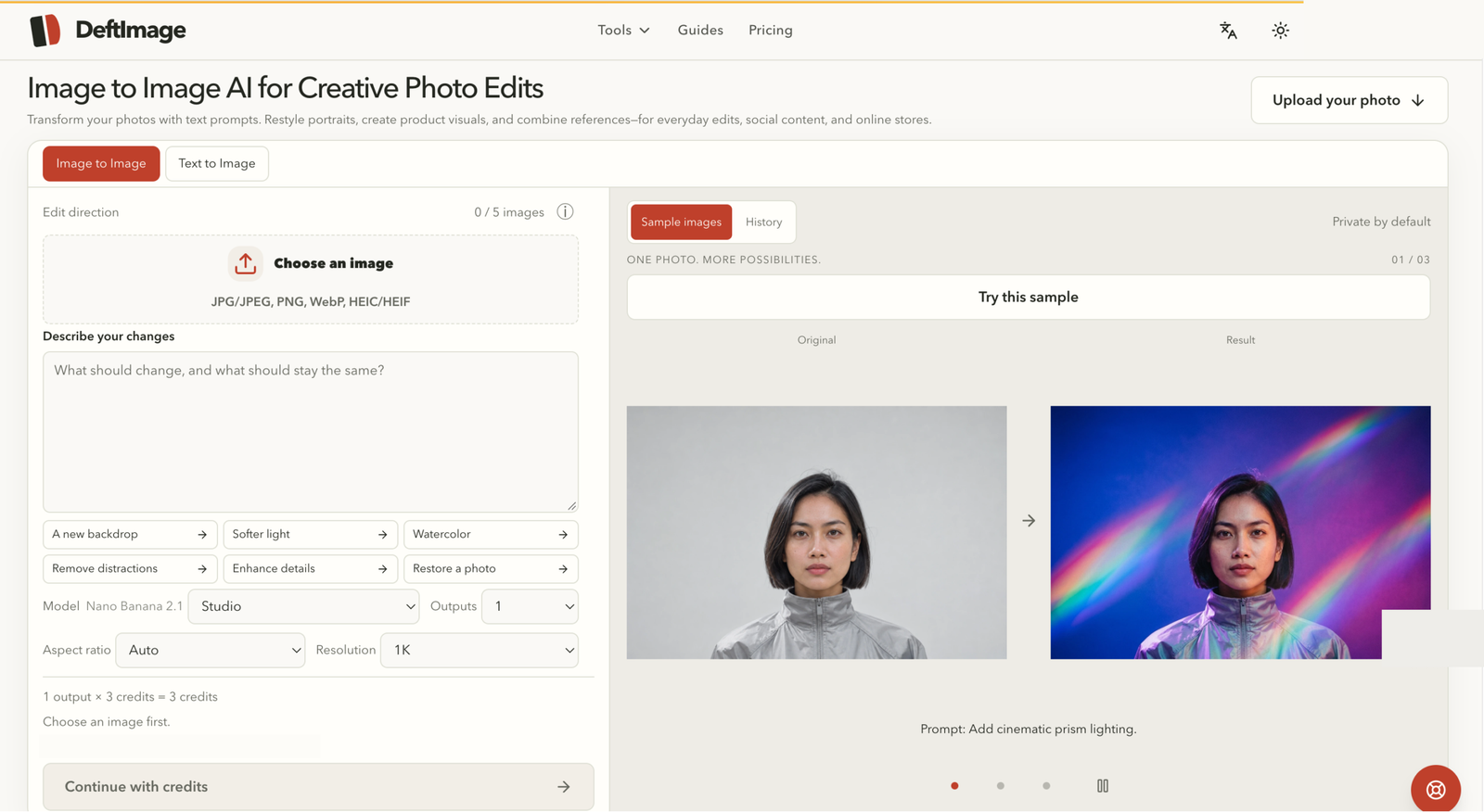
DeftImage is a browser-based AI image editing and generation tool for people who want to change a photo by describing the change in words. Instead of learning layers, masks and complex menus, you upload a picture, type a plain-language prompt, and let the AI produce a revised version. You can add up to five reference images to guide the result and compare the original with the edit side by side before you download it.
The core of DeftImage is Image to Image editing: restyle a portrait, adjust a scene, or rework a product photo while keeping the composition you started with. Around it sits a set of focused tools. Text to Image creates pictures from a written description when you do not have a source photo.
Image to Sketch converts a photo into a sketch-style drawing. AI Image Combiner merges multiple reference images into one result. Outfit Changer and Hairstyle Changer let you preview a different outfit or hairstyle on a portrait, which is useful for trying looks before committing to them in real life.
DeftImage is made for individuals, creators, photographers and online sellers. Typical jobs include refreshing a profile portrait, preparing product visuals for a listing, producing variations of social content, and testing visual ideas quickly without a full design workflow. Everything runs in the browser, so there is nothing to install or update.
The service is offered in English, Chinese, Spanish and German. Pricing is credit-based: credit packs start at $4.90 for 120 credits, and subscriptions start at $9.90 per month for 450 credits, so occasional users can pay once while regular creators can switch to a monthly allowance. The current plans and credit costs are listed on the pricing page at deftimage.com/pricing.
Whether you are fixing a single portrait or producing a batch of product images, DeftImage keeps the workflow short: upload, describe, compare, download.
What makes DeftImage different
Many AI image tools focus on generating pictures from scratch. DeftImage focuses on editing the photos you already have. You describe the change in plain words, optionally add up to five reference images, and compare the original with the result before downloading. Dedicated tools for outfit changes, hairstyle changes, image combining and sketch conversion sit next to the general editor, so common jobs take one step instead of a long prompt session. It runs in the browser with credit packs starting at $4.90, so casual users are not forced into a subscription.
How DeftImage works
- 1
Open DeftImage in your browser and choose a tool, such as Image to Image editing, Outfit Changer or Hairstyle Changer.
- 2
Upload the photo you want to change, or start from a text description if you are generating an image from scratch.
- 3
Type a prompt describing the change you want, in plain words, as specific or as simple as you like.
- 4
Optionally add up to five reference images to guide the style, outfit, hairstyle or look of the result.
- 5
Review the result next to the original in the comparison view, then download the version you are happy with.
Key features
DeftImage use cases
Refresh a profile or portrait photo by restyling it with a prompt: change the mood, background or overall look while keeping the person recognizable, then compare versions side by side and keep the one that fits your profile or portfolio best.
Online sellers can rework product photos into cleaner listing visuals, place items into new scenes with reference images, and produce consistent variations for a shop without booking a photographer or learning professional editing software for every small change.
Creators can produce fresh variations of photos for posts and covers, test outfit or hairstyle looks on themselves, and turn ordinary pictures into eye-catching visuals that match the style of a channel or campaign in minutes.
People considering a new haircut or color can upload a portrait and preview different hairstyles on their own face first, which makes the conversation with a salon easier and reduces the risk of a style that does not suit them.
Small teams can sketch visual ideas fast by combining reference images or converting photos to sketches, giving designers and clients something concrete to react to before anyone invests time in a full production workflow.
Pros & cons
- Prompt-based editing means you describe changes in plain words instead of learning complex layers, masks and selection tools.
- Runs entirely in the browser, so there is nothing to install and your work is available on any computer.
- Side-by-side comparison shows the original next to the edit, making it easy to judge the result before downloading.
- Supports up to five reference images, so style, outfit and hairstyle changes can follow examples you provide.
- Credit packs start at $4.90, so occasional users can pay once instead of committing to a subscription.
Who it's for
DeftImage pricing
- Access to the image editing tools
- 120 credits for prompt-based edits and image generation
- 450 credits per month for regular creation
Plans and prices as listed on the DeftImage website, last checked November 2026. Check their site for the latest pricing.
Frequently asked questions
What is DeftImage?
DeftImage is a browser-based AI image editing and generation tool. You upload a photo, describe the change you want in a text prompt, and the AI produces an edited version. It also creates images from text, converts photos to sketches, combines reference images, and includes dedicated outfit and hairstyle changers for portraits.
Do I need to install anything or learn photo editing?
No. DeftImage runs in the browser, so there is nothing to install. The workflow is upload, describe, compare and download. You do not need experience with layers, masks or other professional editing techniques, because the changes are described in plain words and applied by the AI.
How does pricing work?
DeftImage uses credits. Credit packs start at $4.90 for 120 credits as a one-time purchase, and subscriptions start at $9.90 per month for 450 credits. Occasional users can buy a pack when they need it, while regular creators usually prefer the monthly allowance. Current plans are listed on the pricing page.
What kinds of photos can I edit?
Most users edit portraits, product photos and social content. You can restyle a portrait, preview outfits and hairstyles, combine up to five reference images, or convert a photo into a sketch. Results depend on the source photo and the prompt, and the comparison view helps you judge the edit before downloading.
Can I use DeftImage for my online shop?
Yes, online sellers are one of the main audiences. You can rework product photos, create listing variations and prepare visuals for your shop pages. You are responsible for making sure your source images and your intended use follow applicable rules and the terms published on deftimage.com.
Which languages does DeftImage support?
The DeftImage interface is available in English, Chinese, Spanish and German. You can write prompts in plain language describing the change you want, add reference images for guidance, and review the result next to the original before you download it.
Is DeftImage free?
DeftImage has a free plan, with paid plans for heavier use. Check the DeftImage website for current pricing.
What is DeftImage used for?
Edit photos with text prompts and AI in your browser. DeftImage is a browser-based AI image editing and generation tool for people who want to change a photo by describing the change in words. Instead of learning layers, masks and complex menus, you upload a picture, type a plain-language prompt,…
Who is DeftImage for?
DeftImage is built for Individuals, Content creators, Photographers and Online sellers.
What are the best alternatives to DeftImage?
Similar tools in our directory include Gemini Nano Banana, Text to GIF, Private Try-On.
Similar AI Image Generators
 Gemini Nano Banana
Create and edit reference-led images, then explore video with Veo and Gemini Omni.
Free Trial Text to GIF
Turn your words into original animated GIFs with AI.
Freemium Private Try-On
AI virtual try-on for your next outfit
Paid Nano Banana CN
Nano Banana, GPT Image & Seedance AI image and video
Freemium ClickCrit
AI thumbnail concepts for Roblox creators: turn a reference image and brief into four distinct 1920×1080 concepts to compare and refine.
Freemium generowanieobrazow
Turn Polish text prompts into 2K AI images, ready to download
Freemium AI Photo Generator Studio
Free AI photo generator: create realistic images from text or photos
Freemium FLUX 3 Image
Free FLUX AI image generator and editor in your browser
FreemiumHave a tool like DeftImage? List it on AI SEO Gazette.
Free listings are reviewed by our editors. Featured is $15, one time.
 DeftImage
Visit