


A “Where we are listed” page is one page on your own website that links to every directory, review site and publication that features your tool. It gives visitors proof that others know you, helps search engines find and connect your profiles, and gives AI assistants a clean list of trusted places that confirm your tool is real. It takes about 30 minutes to build.
Key takeaways
- One page on your domain that lists and links every place your tool is featured.
- Link it from your footer so visitors and crawlers can always reach it.
- Add the same profile URLs to the
sameAsproperty in your Organization schema. - Use badges where a site offers one, and plain named links everywhere else.
- Update it every time a new listing goes live and remove dead links.
Why a “Where we are listed” page matters for your tool
Most tool owners submit to directories, launch on a few platforms and then forget the links exist. Those listings are spread across the web with nothing tying them back to your site. A “Where we are listed” page fixes that in one place.
For search engines, it is about discovery and context. Google says it uses links as a signal when determining the relevancy of pages and to find new pages to crawl. Linking out to your profiles with clear, descriptive text helps Google find them and understand that they are about your tool.
For AI search (AEO and GEO), it is about identity. Schema.org defines sameAs as a URL of a reference page that unambiguously indicates the item’s identity, and Google’s Organization structured data docs let you list several of these profile URLs. When your own page, your schema and your listings all point to each other, assistants like ChatGPT, Perplexity and Google’s AI Mode have an easier time confirming who you are and what your tool does.
For people, it is simple trust. A buyer who lands on your site and sees you are listed and reviewed in several places is more likely to sign up.

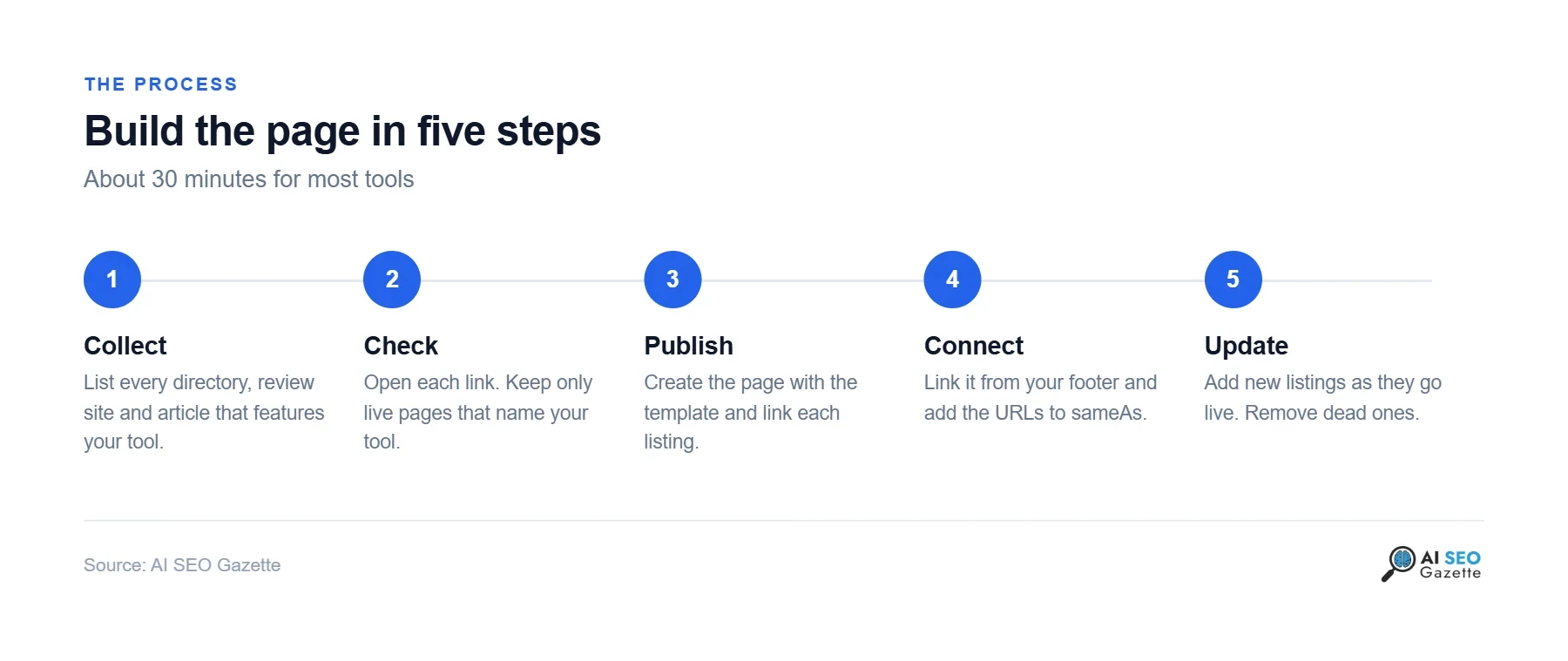
How to create a “Where we are listed” page in five steps
1. Collect every listing
Search your tool name in Google and in each directory you remember submitting to. Check your email for “your tool is live” messages. Add launch platforms, review sites, newsletters and articles that mention you. If you are listed on AI SEO Gazette, your profile is at https://aiseogazette.com/tools/your-tool/.
2. Check each link
Open every URL. Keep only pages that are live, show your tool by name and are on sites you are happy to be linked with. Drop anything that is spammy or no longer exists.
3. Publish the page
Use a short, clear URL such as /where-we-are-listed/ or /featured-on/. Paste the template below and fill in your listings. Group them by type (directories, reviews, launches, press) once you have more than eight or nine.
4. Connect it
Link the page from your site footer with plain text like “Where we are listed”. Then add the same profile URLs to the sameAs list in your Organization schema (example below).
5. Keep it updated
Add new listings the day they go live. Once a quarter, open every link again and remove the dead ones.
Copy-paste template for your “Where we are listed” page
Paste this into an HTML or code block on your page. Replace the names and URLs with your own. The first item is the AI SEO Gazette badge; get the exact code for your tool from the “Get the code” button on your listing in our tools directory.
<h1>Where we are listed</h1>
<p>Find YourTool on these directories, review sites and publications.</p>

<h2>Directories</h2>
<ul>
  <li>
    <a href="https://aiseogazette.com/tools/your-tool/">
      <img src="https://aiseogazette.com/badge.svg" alt="YourTool on AI SEO Gazette" width="220" height="56">
    </a>
  </li>
  <li><a href="https://example-directory.com/your-tool">YourTool on Example Directory</a> (AI tools directory)</li>
</ul>

<h2>Reviews and launches</h2>
<ul>
  <li><a href="https://example-reviews.com/your-tool">YourTool reviews on Example Reviews</a> (software reviews)</li>
  <li><a href="https://example-launch.com/your-tool">YourTool launch on Example Launch</a> (product launch)</li>
</ul>
Add the same URLs to your schema
Put this in the <head> of your homepage, or merge the sameAs list into the Organization schema you already have:
<script type="application/ld+json">
{
  "@context": "https://schema.org",
  "@type": "Organization",
  "name": "YourTool",
  "url": "https://yourtool.com/",
  "sameAs": [
    "https://aiseogazette.com/tools/your-tool/",
    "https://example-directory.com/your-tool",
    "https://example-reviews.com/your-tool"
  ]
}
</script>
Checklist before you publish
- Every link opens a live page that names your tool.
- Link text says the tool name and the site, not “click here”.
- Badges have alt text that names your tool.
- The page is linked from your footer.
- The page is not set to noindex.
- The same URLs are in your Organization
sameAslist. - A calendar reminder exists to review the links every quarter.
Mistakes to avoid
- Listing spam directories. A long list of low-quality sites looks worse than a short list of good ones.
- Images with no links. A row of logos that link nowhere gives search engines nothing to follow.
- Hiding the page. If nothing links to it, crawlers may never find it.
- Letting it rot. Dead links make the page look abandoned.
Not listed on AI SEO Gazette yet? You can submit your tool for free, and browse AI search and GEO tools to track how assistants mention you. For more on how AI search picks its sources, read Google boosts external links in AI search results, Reddit’s impact on AI search trust and how AI agent startups can tell which free listings actually send users.
Frequently asked questions
What should I call the page?
“Where we are listed”, “Featured on” or “As seen on” all work. Pick the one that fits your site and use a short matching URL.
Should the links on the page be nofollow?
No need. You are linking to your own profiles on sites you chose. Plain links are fine.
How many listings do I need before building the page?
Three or four good ones are enough to start. Add more as they go live.
Does this help with AI search tools like ChatGPT and Perplexity?
It helps them confirm your identity. When your site, your schema and trusted third-party profiles all point to each other, it is easier for assistants to connect them to your tool. It is one signal among many, not a guarantee of being cited.
Where do I get the AI SEO Gazette badge code?
Open your tool’s listing on aiseogazette.com and click “Get the code” in the sidebar. You can pick Auto, Light or Dark and copy it in one click.
Sources
- Google Search Central, “Link best practices for Google”: developers.google.com
- Google Search Central, “Organization structured data”: developers.google.com
- Schema.org, “sameAs”: schema.org