

 Made in India
Connect AI assistants to Atoa payments through Model Context Protocol
Listed on AI SEO Gazette
https://mcp.atoa.me/mcpWhat is Atoa MCP Server?
Atoa MCP Server connects compatible AI assistants to an Atoa payments account using the Model Context Protocol. It gives business teams and developers a conversational way to work with payment information and supported payment actions. Instead of manually moving between an assistant and a payment dashboard, users can ask their connected assistant to retrieve the relevant information or call an available tool.
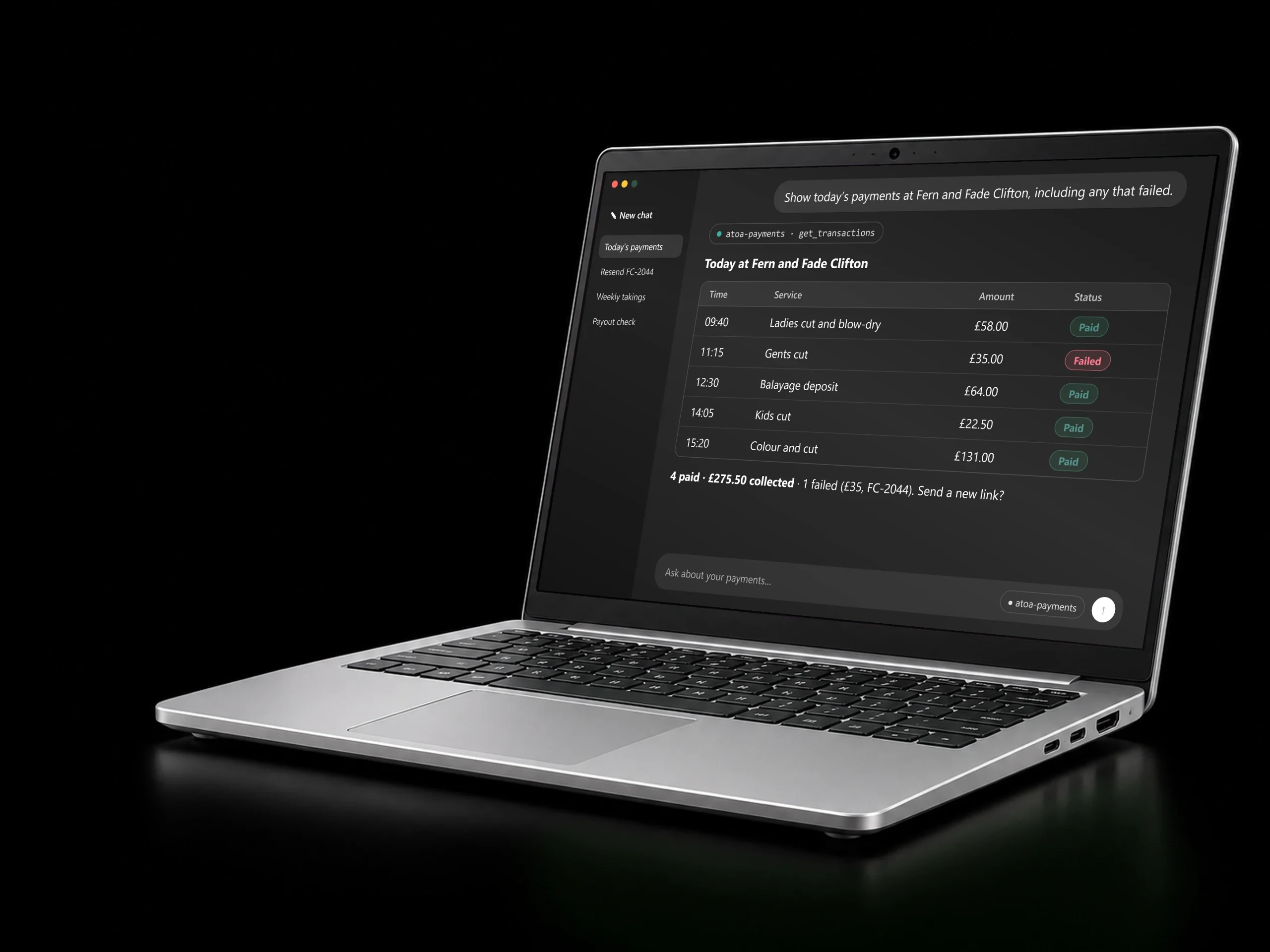
The server supports workflows such as creating payment requests, checking payment status, searching transactions, managing customers, issuing refunds and reading connected bank feeds. A business can ask about today’s payments, investigate a failed payment, or check whether a payout has arrived. The assistant uses the tools exposed by Atoa to carry out the supported parts of the request within the connected account.
Atoa provides a hosted endpoint at https://mcp.atoa.me/mcp. A compatible client connects using an Atoa access key and an environment header. Sandbox credentials are used for testing, while production credentials are used for live account operations. Matching the key to the selected environment is part of the setup. Developers who prefer a local connection can also consult the documentation for the Node package route.
The integration is intended for Atoa customers, payment operations teams and developers building assistant-based workflows around business payments. The official setup page includes examples for clients such as Claude Code, Cursor, Grok and VS Code. Client support for the required transport and authentication headers should be checked before connecting.
This is a connection to Atoa’s payment platform, rather than a separate general-purpose chatbot. An Atoa account and suitable access are required. The integration does not remove the need to review consequential payment actions or protect account credentials.
Production payment processing remains subject to Atoa’s normal commercial pricing; a sandbox provides a separate environment for integration testing. Teams can begin with simple information requests, validate the results against their payment records, and then introduce the supported workflows appropriate for their business.
What makes Atoa MCP Server different
Atoa MCP Server focuses on payment operations within an existing Atoa business account. It brings payment requests, transaction information, customer management, refunds and bank feed access into compatible AI assistants through one standard interface. The hosted endpoint removes the need to operate a separate server for a typical remote connection. Sandbox and production environments let developers test the integration before using live credentials. The server is part of Atoa's wider payment platform, so the available actions relate to actual account workflows rather than a standalone conversational demonstration. Teams choose a compatible client and configure the required authentication headers.
How Atoa MCP Server works
- 1
Open the API Access section of your Atoa dashboard and obtain the appropriate sandbox credentials for testing.
- 2
Configure a compatible MCP client with the hosted server URL and the required authentication and environment headers.
- 3
Ask a simple payment information question and review the returned account data to validate the connection.
- 4
After testing, configure production credentials for approved live workflows and review consequential actions before proceeding.
Key features
Atoa MCP Server use cases
Daily payment review
Ask a connected assistant to retrieve today’s payment records, identify which transactions succeeded, and highlight failed payments that the operations team needs to investigate.
Payment follow-up
Use available payment request and status tools to support a customer payment enquiry, inspect the relevant record, and decide which approved follow-up action is appropriate.
Reconciliation support
Retrieve transaction and connected bank feed information through the assistant so a team member can compare records and investigate differences in their normal reconciliation process.
Developer testing
Connect an MCP-compatible client to the sandbox, exercise supported payment workflows with test credentials, and check the integration behavior before enabling appropriate live account operations.
Pros & cons
- Hosted endpoint avoids running a separate local server
- Sandbox environment supports testing before production payment operations
- Connects payment information to compatible conversational AI assistants
- Requires an Atoa account and valid access credentials
- Production payment processing is subject to transaction fees
- Client must support the required transport and authentication headers
Who it's for
Atoa MCP Server pricing
- Connect compatible assistants
- normal payment transaction fees apply
- Live payment processing under your Atoa agreement
Plans and prices as listed on the Atoa MCP Server website, last checked November 2026. Check their site for the latest pricing.
Frequently asked questions
What does Atoa MCP Server connect to?
The server connects a compatible AI assistant to your Atoa payments account. It exposes supported payment tools so the assistant can retrieve payment information or perform available account actions. You need an Atoa account, appropriate credentials and a client that supports the required MCP connection.
Do I need to host a server myself?
Atoa provides a hosted endpoint, so the remote connection does not require you to operate your own server. Configure the server URL and the necessary authentication headers in a compatible client. The official documentation also describes a local Node package route for developers who prefer that setup.
Can I test the integration before going live?
Yes. The setup supports sandbox and production environments. Start with the sandbox secret and the sandbox environment header when testing your client configuration and workflows. The credential and selected environment must match. Switch to production credentials only when you are ready for approved live account operations.
Which AI clients can I use?
The official setup page provides examples for clients including Claude Code, Cursor, Grok and VS Code. Check that your chosen client supports the relevant MCP transport and authentication headers. Client configuration varies, so follow the current Atoa documentation and the instructions for your specific assistant application.
Is payment processing free?
Atoa states that integrations are included with its plans, while normal payment transaction fees continue to apply. The MCP connection should therefore not be interpreted as free production payment processing. Consult Atoa for pricing that applies to your business and use the sandbox for integration testing.
Is Atoa MCP Server free?
Atoa MCP Server is a paid tool. Check the Atoa MCP Server website for current pricing.
What is Atoa MCP Server used for?
Connect AI assistants to Atoa payments through Model Context Protocol. Atoa MCP Server connects compatible AI assistants to an Atoa payments account using the Model Context Protocol. It gives business teams and developers a conversational way to work with payment information and supported payment actions. Instead of manually moving between…
Who is Atoa MCP Server for?
Atoa MCP Server is built for Payment operations teams, Atoa business customers and Developers building payment workflows.
Which apps does Atoa MCP Server work with?
Atoa MCP Server works with Claude Code, Cursor, VS Code / Copilot. It signs in with API key.
What are the best alternatives to Atoa MCP Server?
Similar tools in our directory include OpenAny, FN2, Voice School.
Similar MCP Servers
 OpenAny
The B2A (business to agent) marketplace
Freemium FN2
Cited company research and scheduled research agents through MCP.
Freemium Voice School
Request an online singing lesson at your preferred time
Free Desearch
Web and X search for AI agents through MCP.
Paid Reqode
Product and architecture context for AI coding agents
Free Trial Proofline MCP
Read Proofline reviews and findings from your coding agent.
Freemium Datacircle
Find the best GTM APIs
Free Scrapewise
Live product and price data from any online store, for e-commerce teams and AI agents
Free TrialHave a tool like Atoa MCP Server? List it on AI SEO Gazette.
Free listings are reviewed by our editors. Featured is $15, one time.
 Atoa MCP Server
Visit