

AI SEO for beginners means two things: making your pages easy for Google’s AI Overviews, AI Mode and chatbots like ChatGPT to understand and cite, and using AI tools to do routine SEO work faster. To start, get the SEO basics right, answer real customer questions plainly, fact-check every AI draft and track what changes.
This guide is for bloggers and small business owners who do their own marketing. You don’t need a new budget or a special plugin. You need a short plan, a few free checks and the discipline to edit what AI writes.
Key takeaways
- Google says there are no extra requirements or special optimizations needed to appear in AI Overviews or AI Mode. Normal SEO still does the work.
- AI Overviews showed on 15.69% of queries in November 2025 in Semrush’s study of 10M+ keywords, up from 6.49% in January.
- Search demand is moving between keywords more than it is disappearing, according to Fractl’s 2026 study of 1M+ keywords.
- Use AI for grouping, outlining and first drafts. Keep facts, prices, local details and opinions in human hands.
- Track results in Search Console and GA4 before you change anything, so you can see what worked.
Why AI SEO matters for small sites now
AI answers now sit on top of a large share of Google results. Semrush’s AI Overviews study (updated December 2025) tracked more than 10 million keywords from January to November 2025. AI Overviews appeared on 6.49% of queries in January, peaked at 24.61% in July and settled at 15.69% in November. The same study found AI Overviews spreading past simple questions: over the study period, the share of commercial queries with an AI Overview rose from 8.15% to 18.57%.
Google’s own numbers point the same way. In the Q2 2025 earnings remarks, Sundar Pichai said AI Overviews had over 2 billion monthly users and that overall queries on Search “continued to grow year over year.”
So is search shrinking? In 2024, Gartner predicted that traditional search engine volume would fall 25% by 2026 as people moved to AI chatbots. Fractl tested that prediction in a 2026 study of 1,010,848 high-volume keywords. It found 29% of tracked search volume in measurable decline, but growing keywords made up for it almost exactly: net change was about +16.8 million searches a month. In Fractl’s survey of 1,004 U.S. consumers, 70% said they use AI tools more than a year ago, while only 17% said they use traditional search engines less.
For a blogger or a local business, that means people still search, but some of the questions you used to rank for now get answered on the results page, and new questions are taking their place. Your job is to be the source those answers draw from. For a wider set of numbers, see our AI search statistics roundup.

What does AI SEO actually mean?
People use “AI SEO” for two different jobs, and beginners mix them up.
SEO for AI search. This is about getting your pages shown, cited or recommended in AI Overviews, AI Mode, ChatGPT, Perplexity and Gemini. You may also see it called answer engine optimization or generative engine optimization. Our explainer on what AEO is and how it compares with SEO and GEO covers the terms.
AI for SEO work. This is about using ChatGPT, Claude, Gemini or an SEO tool with AI features to do keyword grouping, outlines, meta descriptions and audits faster.
Most small sites need both, in that order of importance: build pages worth citing, then use AI to save time on the busywork.
Do you need special optimization for AI Overviews?
No. Google’s AI features documentation says: “There are no additional requirements to appear in AI Overviews or AI Mode, nor other special optimizations necessary.” To be shown as a supporting link, a page must be indexed and eligible to appear in Google Search with a snippet.
The same page lists the basics that matter: let Google crawl your site in robots.txt and through your host or CDN, put important content in text, link pages internally, keep Business Profile and Merchant Center details current, and make sure structured data matches the visible text. Google also says clicks from results pages with AI Overviews are “higher quality,” with visitors more likely to spend more time on the site.
Be wary of anyone selling a secret AI Overview trick. If a tactic isn’t on that list, it isn’t required.
How to start AI SEO for beginners: a 6-step plan
This is the order we’d follow on a new blog or a small business site. Each step names who does the work: you, the AI, or your data.
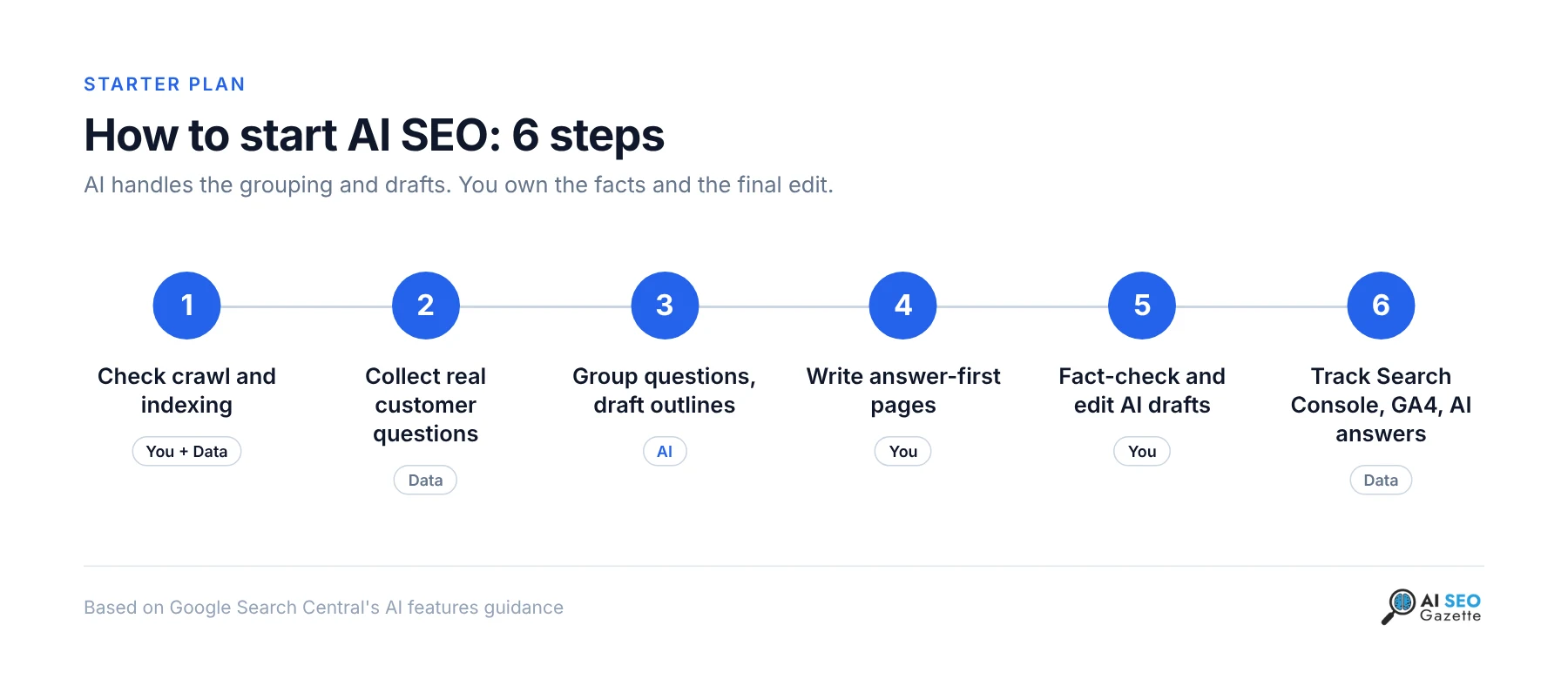
1. Check that Google and AI crawlers can reach your pages
Open yoursite.com/robots.txt and make sure it doesn’t block your content. In Search Console, use URL Inspection on your three most important pages to confirm they are indexed. A free crawler such as the Convertlyft free SEO audit scores up to 16 pages with no account and lists what to fix first.
2. Collect the questions your customers really ask
Pull queries from Search Console, your inbox, sales calls and reviews. These are better than any tool’s suggestions because they come from real buyers. Then widen the list with a keyword tool such as kwrds.ai, which combines Google autosuggest with AI and shows volume, CPC and search intent for each idea.
3. Let AI group the questions and draft outlines
This is where AI earns its keep. Paste your list into a chat tool and ask it to cluster questions by topic and suggest one page per cluster. Use the prompt below. If you want to see which topics you’re missing compared with a competitor, our guide to finding content gaps with AI walks through a sitemap comparison.
4. Write answer-first pages with your own experience
Put a direct 40 to 60 word answer at the top of each page, then the detail. Add what only you know: your prices, your process, photos of your work, a mistake you made and fixed. AI can’t invent that, and it’s what makes a page worth citing. Our AEO checklist covers the on-page items in more depth.
5. Fact-check and edit everything the AI touched
Read every claim against its source. Check titles, meta descriptions and image alt text too. See the manual checks section below.
6. Track results before and after
Note your clicks and impressions in Search Console for the pages you changed, then compare after four to eight weeks. Ask ChatGPT and Perplexity your main questions once a month and record whether your site appears.
Copy-paste prompt: turn customer questions into a page plan
Replace the brackets and paste this into ChatGPT, Claude or Gemini. It keeps the AI on planning duty and away from writing facts it can’t know.
You are helping me plan content for [business or blog name], which serves [audience] in [location, or "online"].

Here are real questions from my customers and from Google Search Console:
[paste 20 to 100 questions, one per line]

Here are the pages I already have:
[paste URLs or page titles]

Tasks:
1. Group the questions into topics. One topic = one page.
2. For each topic, say whether an existing page already covers it (name it) or a new page is needed.
3. For each new page, give: a working title, the main question it answers, and 4 to 6 subheadings written as questions.
4. Mark which subheadings need my first-hand knowledge (prices, process, local details, results).
5. Do not invent statistics, prices, dates or sources. If something needs a fact, write [NEEDS SOURCE].

Return a table with columns: Topic, Existing or new, Title, Main question, Subheadings, Needs my input.
The last two instructions matter most. They force the AI to show you where your knowledge is needed and where it would otherwise guess.
Worked example: we ran the beginner check on one of our own pages
To show what the steps look like in practice, we ran a 10-minute check on our post about content gap analysis on November 22, 2026. We fetched the live page and our robots.txt and looked at each item by hand. You can run the same checks on any page with your browser’s “view source” and Search Console.
| Check | How to do it | What we found | Result |
|---|---|---|---|
| Crawlers allowed | Open /robots.txt | All user agents allowed except /wp-admin/. GPTBot, OAI-SearchBot, ClaudeBot and PerplexityBot are named and allowed. | Pass |
| Indexable with a snippet | Search the source for “robots” | “index, follow, max-snippet:-1”, so Google can show a snippet of any length | Pass |
| Canonical | Search the source for “canonical” | Points to its own URL | Pass |
| Direct answer near the top | Read the first paragraph after the title | A 62-word definition that also says how to do it | Pass (slightly over 60 words) |
| Title and meta description | Count characters | Title 54 characters; description 147 characters | Pass |
| Structured data matches the page | Search the source for “@type” | BlogPosting and FAQPage present; the FAQ questions are also visible on the page | Pass |
| Image alt text | Check each content image | Both article images have descriptive alt text | Pass |
| Fresh, dated sources | Read each stat and its year | One supporting stat comes from a 2017 Ahrefs study. The year is stated, which is right, but it’s the oldest number on the page. | Review |
Seven of eight checks passed. The one to act on is source freshness: when a newer study exists, swap it in; when it doesn’t, keep the year visible as the post already does. Your own site will likely turn up different gaps. Look hardest at robots.txt rules that block a whole folder, images with empty alt text and opening paragraphs that warm up instead of answering.
How can bloggers use AI without hurting rankings?
Google doesn’t ban AI-assisted content. Its guidance on using generative AI content (last updated October 2026) says AI “can be particularly useful when researching a topic, and to add structure to original content.” The risk is volume without value: using AI “to generate many pages without adding value for users may violate” Google’s spam policy on scaled content abuse.
For bloggers, that means a few practical habits:
- Use AI for outlines, headline options and rough drafts, then rewrite in your own voice.
- Publish fewer, better posts rather than a batch of thin ones.
- Add something the AI couldn’t: a test you ran, a photo, a screenshot, a number from your own analytics.
- Consider telling readers how AI helped. Google suggests sharing how a piece of content was created to give readers context.
If more than one person writes for your blog, put the rules in writing: which tasks AI may do alone, which need a human review and which stay fully manual.
What should small businesses do differently?
AI SEO for small business leans local and practical. Customers ask AI tools things like “best plumber near me open Sunday” or “is [your business] any good,” and the answers draw on your website, your Google Business Profile and what others say about you.
- Keep your Business Profile current. Google’s AI features page lists this as a best practice. Hours, services, service area and photos should match your website.
- Give each service its own page. One page per service, with prices or price ranges, the area you cover and answers to the questions customers ask on the phone.
- Collect reviews that mention specifics. “Fixed our boiler same day in Leeds” tells an AI more than “great service.”
- Check what AI tools say about you. The AI Visibility Check is a free 3-question test for local service businesses that shows whether AI assistants recommend you, with fix tips.
To compare more options, browse the SEO tools directory and filter for free plans before you pay for anything.
Where AI gets it wrong: manual checks
Google’s generative AI guidance puts it plainly: models “don’t retrieve facts, but predict a likely sequence of words,” and it is critical “to manually factcheck and review all AI-generated content.” Here’s what to check by hand every time.
- Statistics and their dates. AI tools repeat old numbers as if they were current. A real example from researching this article: the widely quoted “AI Overviews show on 13% of queries” figure comes from the March 2025 version of Semrush’s study. The December 2025 update shows 15.69% for November 2025. Always open the original source and read the date.
- Links and sources. Click every link. AI drafts sometimes cite pages that don’t exist or don’t say what the draft claims.
- Prices, hours and local details. AI will fill gaps with plausible guesses. Only you know your prices.
- Metadata. Google says the review applies to titles, meta descriptions, structured data and image alt text, because these can appear in search results.
- Generic advice. If a paragraph could sit on any competitor’s site unchanged, cut it or add your own example.
- Tone. Read the draft aloud. If it doesn’t sound like you, edit it until it does.
How do you know if AI SEO is working?
Start with Search Console. Google says traffic from AI features is included in your overall search traffic in the Performance report under the “Web” search type, so you won’t see a separate AI Overviews line. Watch clicks and impressions for the pages you updated.
For chatbots, set up a custom channel in Google Analytics. Our guide on tracking ChatGPT and Perplexity traffic in GA4 includes a regex you can copy. Then, once a month, ask ChatGPT and Perplexity your five most important customer questions and note whether you’re mentioned. The 30-minute LLM visibility audit gives you a scoring sheet for that.
Frequently asked questions
Is AI SEO different from regular SEO?
Mostly no. Google says there are no extra requirements to appear in AI Overviews or AI Mode. The difference is emphasis: clear direct answers, first-hand detail and accurate facts matter more, because AI systems pull short passages from pages they trust.
Can I use ChatGPT to write my blog posts?
You can use it to research, outline and draft. Google’s guidance allows AI-assisted content but warns that mass-producing pages without adding value may violate its scaled content abuse policy. Fact-check every claim and add your own experience before publishing.
Do I need to pay for AI SEO tools to get started?
No. Search Console, a free crawler, a free keyword tool and a general AI chat tool cover the basics. Pay for a tool only once you know which task is eating most of your time.
How long does AI SEO take to show results?
There is no fixed timeline. Changes to existing indexed pages can show up in Search Console within weeks, while new pages and chatbot mentions usually take longer. Record a baseline first and compare after four to eight weeks.
Do I need an llms.txt file or special schema for AI search?
Google says no special optimizations are needed for its AI features. Structured data can still help, as long as it matches the visible text on the page. Our AEO checklist covers what Google says you can skip.
Sources
- Google Search Central, “AI features and your website,” developers.google.com/search/docs/appearance/ai-features
- Google Search Central, “Google Search’s guidance on using generative AI content on your website,” developers.google.com/search/docs/fundamentals/using-gen-ai-content
- Semrush, “Semrush AI Overviews Study: What 2025 SEO Data Tells Us About Google’s Search Shift” (updated December 2025, first published March 2025), semrush.com/blog/semrush-ai-overviews-study
- Google, “Q2 earnings call: CEO’s remarks” (July 2025), blog.google
- Fractl, “Search Isn’t Dying, It’s Redistributing” (June 2026), frac.tl/ai-search-study