

 Made in China
Remove video backgrounds in the browser and export a transparent WebM in seconds
Listed on AI SEO Gazette
What is VideoBGcut?
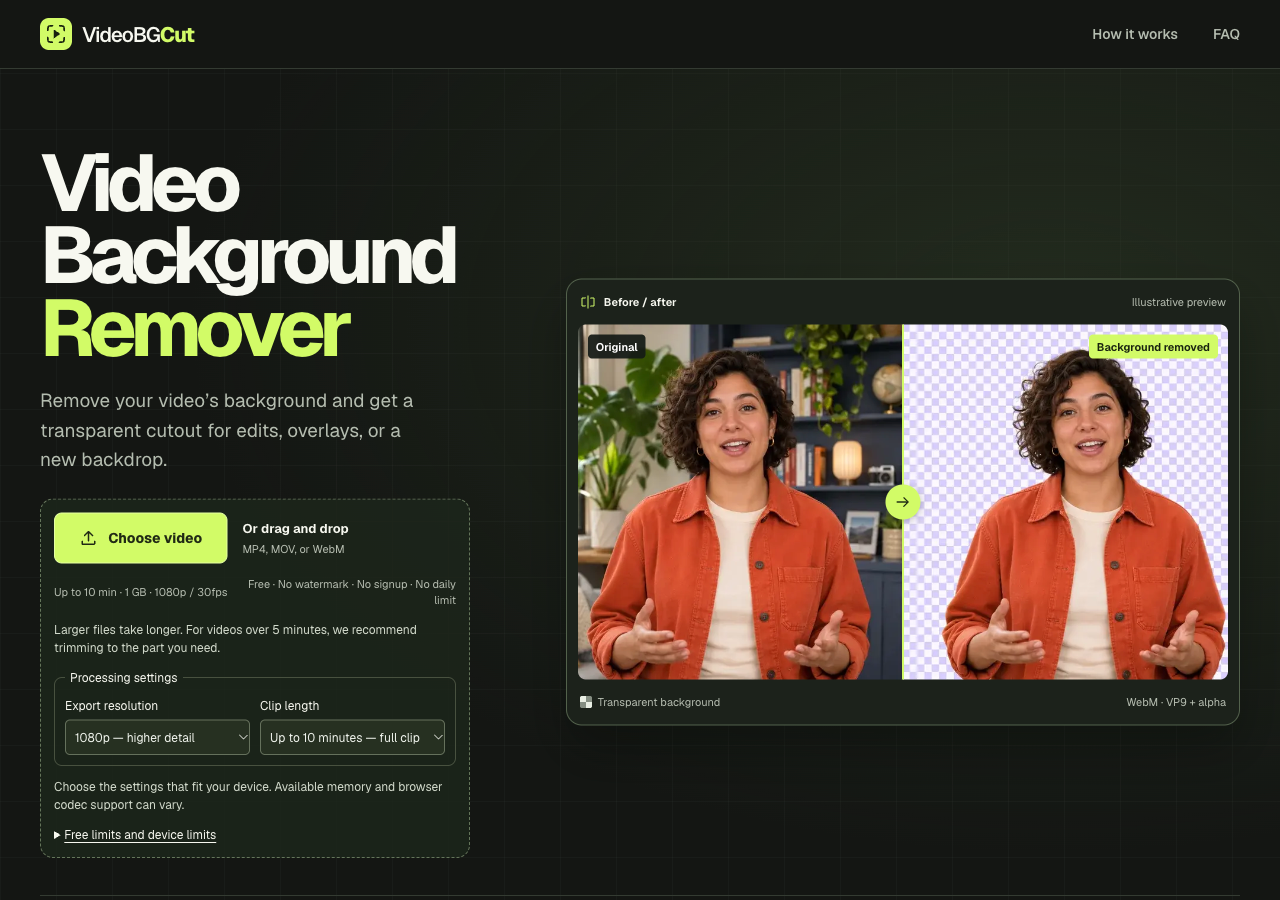
VideoBGcut is a browser-based tool for removing the background from a video clip. A file is loaded as MP4, MOV or WebM, the subject is separated from the background on the page, and the cutout is exported as a WebM with an alpha channel. Nothing is installed and no account is created, so the whole job runs inside the tab that opened the site.
The workflow is short. After the file is loaded, the tool renders a preview where the subject sits against a checkerboard pattern, which makes it easy to see where the mask is clean and where it is not. When the preview looks right, the export button saves the transparent WebM to the local disk, ready to be dropped over a slide, a coloured background, a game scene or a second video in an editor that reads alpha.
Green screen footage is handled like any other footage, which means the tool is not limited to studio setups. A talking-head clip recorded against a plain wall, a product shot on a table or a tutorial recording can all be separated, and the result can be reused without re-shooting anything.
The output format sets the boundaries. Transparent WebM is well supported in browsers and in most modern editors, but it is not accepted everywhere; social platforms and some older editors only take flat MP4 files, so the format has to be converted before upload. Processing time grows with resolution and clip length, and the work runs on the machine that opened the page, so a long or 4K file takes noticeably longer than a short clip.
The tool is aimed at short pieces: a loop for a landing page, a cutout for a thumbnail, or a presenter placed over a diagram. For those jobs it removes the usual step of installing a compositing package and learning a keying workflow, and it keeps the file on the local machine instead of uploading it to a server.
What makes VideoBGcut different
Most background removers are either desktop software that has to be installed and licensed, or web services that upload the file to a server before returning a processed video. VideoBGcut does neither: the separation runs in the browser tab, and the footage never leaves the machine. The other difference is the output. Many tools return a flat video with a new background baked in, while this one returns a transparent WebM with an alpha channel, so the cutout can be reused over any background later. That makes it a one-step tool for short clips rather than a full compositing suite, and it stays free with no account to create.
How VideoBGcut works
- 1
Open the site in a browser, then load a video file from disk in MP4, MOV or WebM format; nothing is uploaded to a server.
- 2
Watch the cutout render against a checkerboard preview to check where the mask holds and where it breaks.
- 3
Use a clip where the subject stands clear of the background, since a clean edge gives a cleaner mask.
- 4
Press export to save a WebM file with an alpha channel to the local disk, then drop it into an editor.
- 5
Place the cutout over a slide, a branded background or a second video in any editor that reads WebM alpha.
Key features
VideoBGcut use cases
Landing pages and product sites can use a short cutout loop of the product or presenter over a branded background without a studio or a post-production pass.
Tutorial and course creators can lift a talking head out of a recording and place it in the corner of a screen recording, so the face stays visible while the demo plays.
Online sellers can strip the background from a product clip shot on a table and place the item on a clean white or coloured backdrop for a listing video.
Social media managers can turn a plain-wall clip into a cutout for stickers, overlays and meme templates, which need a transparent subject on a clean layer.
Game and stream overlays can use a cutout of the streamer so the avatar sits over the game footage without a real green screen behind them.
Pros & cons
- Runs entirely in the browser, so no installer, no account and no remote upload is needed
- Exports a transparent WebM with an alpha channel instead of a flattened video file
- Handles ordinary footage as well as green screen clips, so a plain wall is enough
- Free with no listed usage limit, which suits quick tests and one-off clips
- Transparent WebM is not accepted by every editor or social platform without conversion
- Long or high-resolution files take noticeably longer because processing stays on the local machine
- Masks on fine detail such as hair or motion blur need a clean background to look right
Who it's for
VideoBGcut pricing
- Browser-based background removal for short clips with transparent WebM export and no signup.
Plans and prices as listed on the VideoBGcut website, last checked November 2026. Check their site for the latest pricing.
Frequently asked questions
Is VideoBGcut really free?
Yes. The tool runs in the browser and needs no account, no card and no subscription. No paid tier is listed on the site, so a clip can be processed and exported without entering payment details or creating a profile.
What file formats can be loaded?
MP4, MOV and WebM files are accepted. The export is a WebM file with an alpha channel, which is the format that carries transparency. Clips in other containers have to be converted first, and a free converter is enough for that.
Does the tool upload my video to a server?
The separation happens in the browser tab and the export is saved to the local disk. That is a meaningful difference from web services that take the file, process it on a server and hand back a result, because the footage does not have to leave the machine.
Do I need a green screen?
No. Green screen footage works, and so does ordinary footage shot against a plain wall, because the separation works on the subject rather than on a key colour. A clean and evenly lit background still produces a much better mask than a busy room does.
Why does a long clip take so long?
Processing runs on the machine that opened the page, so time scales with resolution and length. A short clip exports in seconds, while a long or high-resolution file can take minutes, and a slower processor makes the difference larger still.
Can I use the cutout in Premiere or Final Cut?
Editors that read WebM with alpha can import the file directly. Where the editor expects a different codec, the file has to be transcoded to something like ProRes 4444 or a PNG sequence before import, which adds one conversion step.
Is there a limit on clip length?
The site does not state a hard limit. The practical limit comes from the machine, since a browser tab has memory limits and the processing is local. Clips of under a minute run reliably, and very long files can stall.
Is VideoBGcut free?
VideoBGcut is free to use. Check the VideoBGcut website for current pricing.
What is VideoBGcut used for?
Remove video backgrounds in the browser and export a transparent WebM in seconds. VideoBGcut is a browser-based tool for removing the background from a video clip. A file is loaded as MP4, MOV or WebM, the subject is separated from the background on the page, and the cutout is exported as a WebM…
Who is VideoBGcut for?
VideoBGcut is built for Video editors, content creators, social media managers, tutorial producers and online sellers.
What are the best alternatives to VideoBGcut?
Similar tools in our directory include Rapsona, DubbingNow, BGChanger AI.
Similar AI Video Tools
 Rapsona
Turn one photo into a 12-second AI rap video for $5.99
Paid DubbingNow
Dub single-speaker videos and audio into 12 languages with AI voices.
Freemium BGChanger AI
Remove or replace any video background in the browser, without a green screen.
Freemium Jynno
AI Creative Studio for Videos & Images
Freemium AI Pop Video
AI video generator that turns ideas into short pop-style videos.
Freemium Seedance 3.0 AI Video Generator
Independent AI workspace for video, image and audio creation
Freemium OneTake
Short vertical reels from an idea
Paid Burning Bridges AI
Turn one photo into a Burning Bridges party video
PaidHave a tool like VideoBGcut? List it on AI SEO Gazette.
Free listings are reviewed by our editors. Featured is $15, one time.
 VideoBGcut
Visit