

 Made in China
Dub single-speaker videos and audio into 12 languages with AI voices.
Listed on AI SEO Gazette
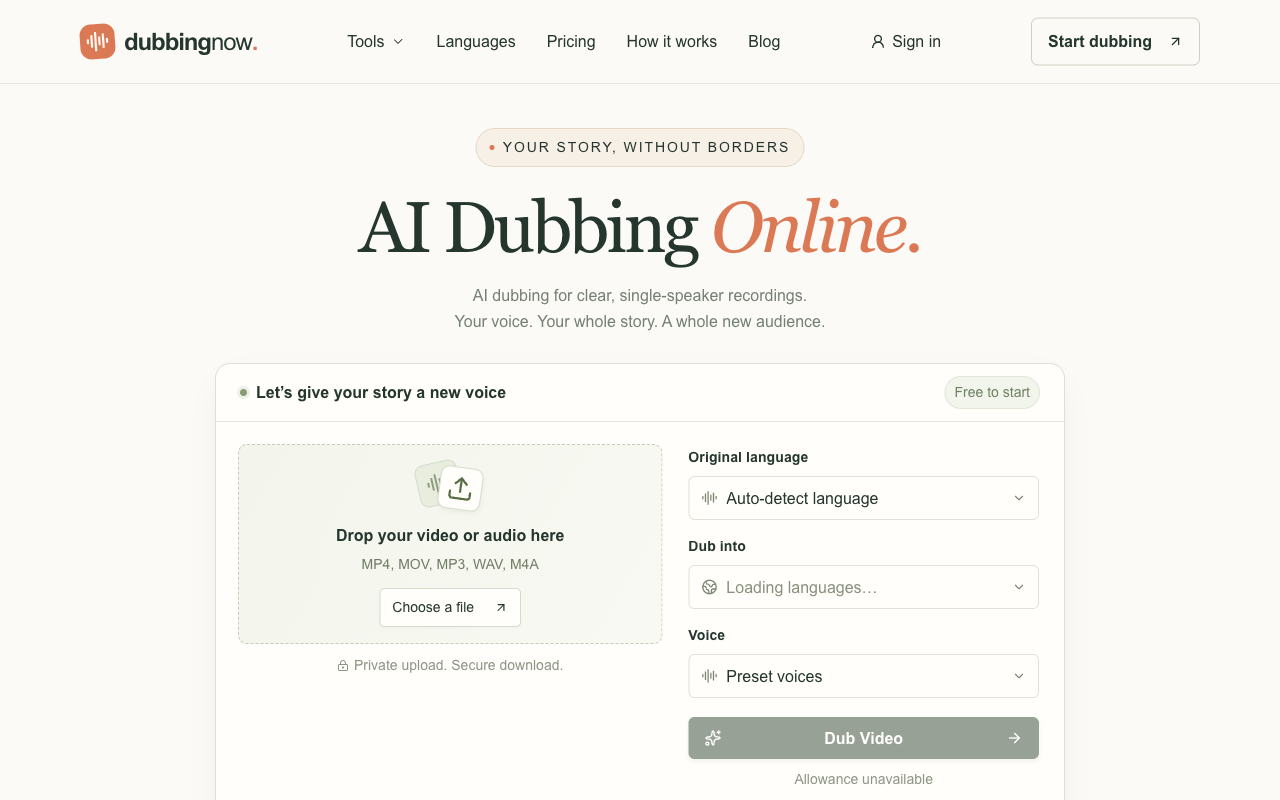
What is DubbingNow?
DubbingNow is a browser based AI dubbing tool for clear, single speaker videos and audio. You upload a recording with one narrator, choose the source language and the language you want, and the tool transcribes the speech, translates it, generates a new voice track and lines that track up with the original recording.
There is nothing to install and no studio work involved. The upload accepts MP4 and MOV video as well as MP3, WAV and M4A audio, so the same workflow covers a YouTube explainer, a recorded lesson, a solo podcast episode or a product walkthrough. Twelve target languages are available: English, Spanish, French, German, Portuguese, Italian, Japanese, Korean, Chinese, Hindi, Arabic and Dutch.
For each target language you can pick a preset voice, or turn on voice cloning so the narrator from your own upload becomes the reference for the new track. Cloning quality depends on how clean the reference speech is and on the language pair, and the tool asks you to listen to the preview before publishing.
The workflow is deliberately short. A new account receives 50 free credits, which is about five minutes of standard dubbing per target language, and a recording of up to 30 seconds can be tried once without signing in. Standard dubbing costs 10 credits per minute and high fidelity mode costs 20 credits per minute, billed by the second and rounded up to whole credits with a minimum of one credit per job.
The tool shows the duration limits and the credit quote before processing starts, and each target language is billed separately against the shared balance. The scope is narrow on purpose. DubbingNow is built for one clear speaker per recording, so multi speaker conversations, lip sync editing and translation of on screen text are not supported in this release.
The new voice track replaces the original audio, including background music, and timing is preserved so the dub follows the pace of the source. Finished results stay available for 24 hours, so the file should be downloaded promptly. Creator at $19 per month and Studio at $49 per month are listed as the next plans, with subscriptions opening soon; the free allowance is usable today.
Overall, DubbingNow is aimed at creators, course sellers, solo podcasters and small teams who want one recording to work in more than one market without hiring a voice studio for every language.
What makes DubbingNow different
DubbingNow keeps the whole job in one browser workflow instead of a production pipeline. You upload one recording with a single clear narrator, pick the source and target language, and choose either a preset voice or a clone built from the narrator in that same upload. The tool transcribes and translates the speech, generates the new voice track and keeps it aligned with the original timing, so the dub does not drift away from the visuals. You listen to the result in the browser before you download it, and the credit cost for the job is shown before processing starts. It is deliberately narrow: one narrator, twelve languages, no manual studio work and nothing to install.
How DubbingNow works
- 1
Create a free account, which comes with 50 credits, then open the dubbing tool and choose whether you are working with a video or an audio file.
- 2
Upload an MP4, MOV, MP3, WAV or M4A recording in which one speaker talks clearly, then pick the source language and the language you want the dub in.
- 3
Choose a preset voice for the target language or enable voice cloning so the narrator from your own recording is used as the reference.
- 4
Check the quoted credit cost and the recording limits shown by the tool, then start the job and wait for the transcript, translation and voice track.
- 5
Preview the dubbed track in the browser against the original timing, then download it before processed results expire after 24 hours.
Key features
DubbingNow use cases
Course sellers who record a lesson once in English and want the same lesson available to learners in Spanish, German or Japanese without booking a voice actor for each market.
YouTube and short-form creators who publish single-narrator explainers and want to offer a second or third language version of the same video to reach a wider audience.
Podcasters with solo episodes who want a translated audio version of an episode so listeners in another language can follow the same story without reading subtitles.
Small marketing teams that produce one product walkthrough video and need localized audio for regional landing pages, ad tests and launch emails in several markets.
Founders and consultants who record a pitch or a webinar on their own and want a dubbed copy they can send to partners and clients abroad before a call.
Pros & cons
- Free account with 50 credits and a 30-second try without signing in.
- Voice cloning uses the narrator from your own upload, so the dub keeps the speaker identity.
- Timing is preserved, so the translated speech follows the original recording.
- No install and no studio work: the whole job runs in the browser.
- Credit cost and duration limits are shown before a job starts.
- One clear speaker per recording; multi-speaker conversations are not supported.
- No lip-sync editing and no translation of on-screen text.
- Results stay available for 24 hours, so files must be downloaded promptly.
- Creator and Studio subscriptions are listed but not open for purchase yet.
Who it's for
DubbingNow pricing
- 50 credits
- 5 minutes per target language
- audio and video dubbing
- download the finished recording
- 200 credits
- 20 minutes per target language
- monthly dubbing allowance
- audio and video dubbing
- download
- 600 credits
- 60 minutes per target language
- monthly dubbing allowance
- audio and video dubbing
- download
Plans and prices as listed on the DubbingNow website, last checked November 2026. Check their site for the latest pricing.
Frequently asked questions
Does DubbingNow have a free plan?
Yes. A new account gets 50 credits at no cost, which is about five minutes of standard dubbing per target language, and that allowance covers both audio and video dubbing with a download of the finished recording. There is also a single try of a recording up to 30 seconds without signing in. Paid Creator and Studio subscriptions are listed but not open for purchase yet.
How are dubbing credits counted?
Standard dubbing costs 10 credits per minute of audio and high-fidelity mode costs 20 credits per minute, billed by the second and rounded up to whole credits with a minimum of one credit per job. Each target language is billed separately against the shared plan balance, and the tool shows the credit quote for a job before processing begins.
What kind of recordings does it support?
DubbingNow is built for one clear speaker per recording. It accepts MP4, MOV, MP3, WAV and M4A files and works on spoken narration rather than multi-speaker conversations. Multi-speaker dialogue, lip-sync editing and translation of on-screen text are not supported in this release, so a single narrator recording gives the most predictable result.
Does it keep the original narrator's voice?
You can pick a preset voice for the target language, or turn on voice cloning so the narrator from your own upload is used as the reference speech for the new track. Cloning quality depends on how clean the reference recording is and on the language pair, so the tool asks you to listen to the preview before you share the dub.
How long does a dub take and how long do results stay available?
Processing time depends on the length of the recording and on queue load at the moment you submit, and the tool displays the current limits before the job is accepted. Once a job finishes, the dubbed result stays available for 24 hours, so download the file promptly if you plan to publish it later.
What happens to the original audio and the timing?
The new voice track replaces the original audio, including any background music, and the generated speech is aligned with the original recording so the dub follows the same pace as the source. DubbingNow does not edit mouths or lip movements, so on-camera speakers will not be re-animated to match the new language.
Is DubbingNow free?
DubbingNow has a free plan, with paid plans for heavier use. Check the DubbingNow website for current pricing.
What is DubbingNow used for?
Dub single-speaker videos and audio into 12 languages with AI voices. DubbingNow is a browser based AI dubbing tool for clear, single speaker videos and audio. You upload a recording with one narrator, choose the source language and the language you want, and the tool transcribes the speech, translates it, generates…
Who is DubbingNow for?
DubbingNow is built for course sellers, YouTube and short-form creators, solo podcasters, small marketing teams and founders and consultants.
What are the best alternatives to DubbingNow?
Similar tools in our directory include BGChanger AI, Jynno, AI Pop Video.
Similar AI Video Tools
 BGChanger AI
Remove or replace any video background in the browser, without a green screen.
Freemium Jynno
AI Creative Studio for Videos & Images
Freemium AI Pop Video
AI video generator that turns ideas into short pop-style videos.
Freemium Seedance 3.0 AI Video Generator
Independent AI workspace for video, image and audio creation
Freemium OneTake
Short vertical reels from an idea
Paid Burning Bridges AI
Turn one photo into a Burning Bridges party video
Paid Bulin 47 AI
Star in the Bulin 47 freestyle trend from one photo
Paid Ozil Goal AI Video
Score Mesut Özil's famous 2016 goal yourself, from one photo.
PaidHave a tool like DubbingNow? List it on AI SEO Gazette.
Free listings are reviewed by our editors. Featured is $15, one time.
 DubbingNow
Visit