

 Made in United States
Create cinematic videos with MAGI-2 from text or frames
Listed on AI SEO Gazette
What is Magi-2 AI Video Generator?
Magi-2 Video is an independent web workspace for AI video and still-image creation. Its featured video model is MAGI-2. You start with a written scene, or you add a first frame and, optionally, a last frame when you want more control over how a clip begins and ends. The same site also provides an AI Image workspace and an AI Effects area where you can pick a performance, add your photos, and recreate the shot.
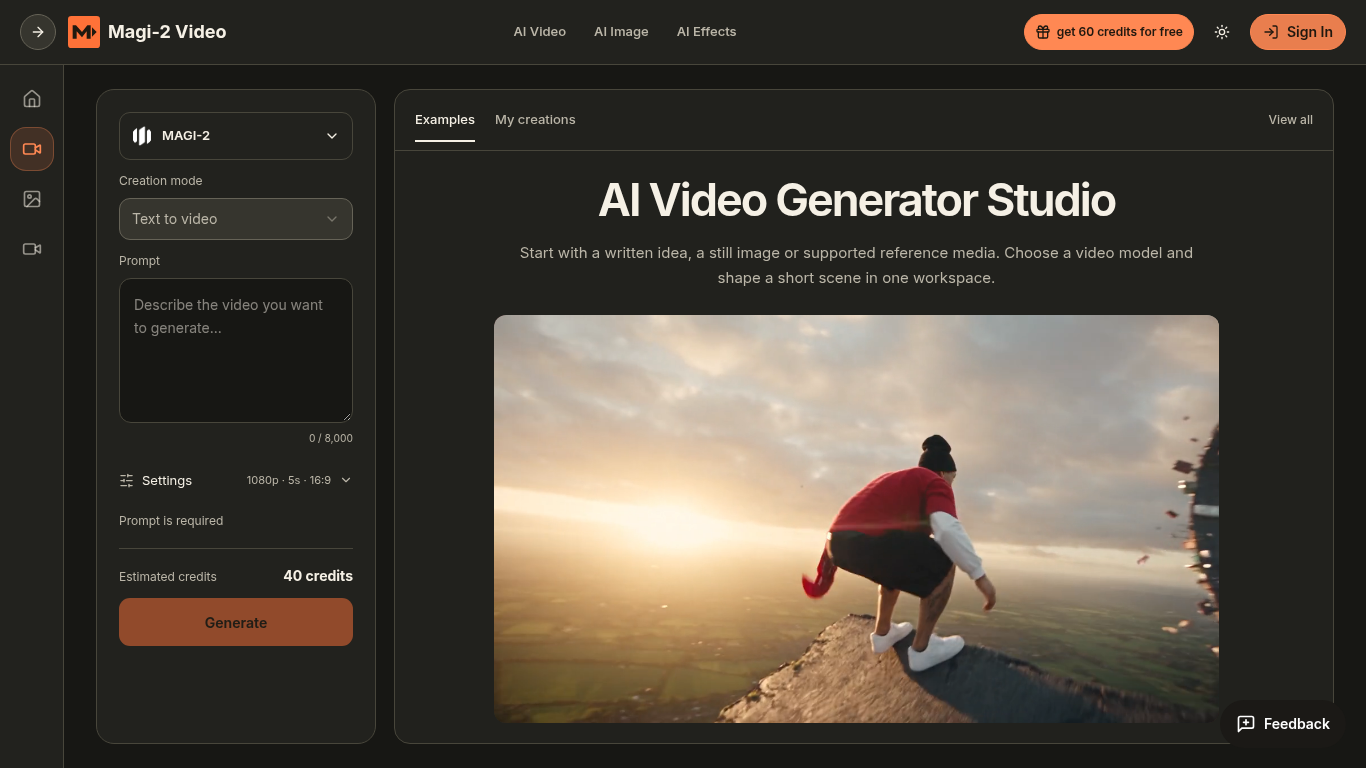
To make a MAGI-2 video, choose Video on the homepage or open the video workspace, write a prompt that names a subject, a setting, and a visible action, and select MAGI-2. The site suggests keeping one main action in focus and adding lighting or style only when it helps communicate the scene. Creation modes shown for MAGI-2 include Text Only, First Frame, and First and Last Frames. Reference stills can be uploaded as JPEG, PNG, or WebP.
MAGI-2 outputs one 1080p clip per request, with a duration from 4 to 30 seconds. Aspect ratios offered on the homepage include 21:9, 16:9, 4:3, 1:1, 3:4, and 9:16. Sound can be turned on. The workspace shows a credit estimate before you submit. MAGI-2 costs eight credits per second, so a five-second clip costs 40 credits and a ten-second clip costs 80.
You can browse effects and compose a draft while signed out. Sign in before submitting so the job, credit balance, and finished clip belong to your account. Finished work is played and downloaded from My creations. The AI Image workspace is meant for stills, and a still can be reused as a MAGI-2 first frame, which makes it easy to design an opening composition and then animate it.
Pricing is freemium. The Basic plan is free and includes 10 one-time signup credits, generation history, and original image and video downloads. Watermark-free downloads require a paid plan, and subscription credits renew with the active plan. Output quality depends on the selected model.
Typical uses include cinematic or imagined scenes written as a prompt, shots whose opening or ending composition is set with a first frame and optional last frame, vertical 9:16 clips for a phone screen, wide 16:9 or 21:9 frames for landscape, and short product, travel, character, or storyboard clips. Results vary and examples do not promise the same output.
Magi-2 Video is independently operated and is not affiliated with or endorsed by Sand AI or the MAGI-2 team. MAGI-2 is a model developed by Sand AI.
What makes Magi-2 AI Video Generator different
Magi-2 Video is built around the MAGI-2 model for cinematic generation from a written prompt or from frames. You can start from text only, add a first frame, or set both a first and last frame to control how a clip begins and ends. Each request returns one 1080p clip of 4 to 30 seconds, and a credit estimate appears before you generate. A separate AI Image workspace lets you make a still and reuse it as a first frame. The site is independently operated and is not affiliated with or endorsed by Sand AI or the MAGI-2 team.
How Magi-2 AI Video Generator works
- 1
Open the video workspace or choose Video on the homepage, then select the MAGI-2 model from the model list shown in the composer.
- 2
Write a prompt naming a subject, a setting, and one visible action, or upload a first frame and optionally a last frame as JPEG, PNG, or WebP.
- 3
Pick an aspect ratio from 21:9 to 9:16, a duration from 4 to 30 seconds, and turn sound on if you want it, then check the credit estimate.
- 4
Sign in, submit the job, and then play and download the finished clip from My creations in your account.
Key features
Magi-2 AI Video Generator use cases
Cinematic scenes
Write a short prompt with a subject, a setting, and a visible action to generate an imagined cinematic clip, and keep one main action in focus for the clearest result.
Controlled openings and endings
Upload a first frame and an optional last frame so the clip starts and ends on compositions you chose, which helps with storyboards and planned shots.
Phone and widescreen formats
Choose vertical 9:16 for a phone screen or wide 16:9 and 21:9 frames for landscape, so the same idea can be framed for different places.
Stills into motion
Create a still in the AI Image workspace first, then reuse that image as a MAGI-2 first frame to animate it as a short product, travel, or character clip.
Pros & cons
- Write a prompt or add a first and last frame to control a clip
- MAGI-2 outputs a 1080p clip of 4 to 30 seconds per request
- Credit estimate is shown before you submit any generation job
- Free Basic plan includes 10 signup credits to try the workspace
- Separate AI Image workspace for stills that can become first frames
- Watermark-free downloads require a paid plan, not the free Basic plan
- Signing in is needed before you can submit a generation job
- MAGI-2 uses eight credits per second so long clips use many credits
Who it's for
Magi-2 AI Video Generator pricing
- 10 signup credits
- generation history
- original image and video downloads
- watermark-free downloads require payment
- 6,600 credits per year
- up to 1,100 images
- up to 366 videos
- watermark-free downloads
- 18,000 credits per year
- up to 3,000 images
- up to 1,000 videos
- credits across image and video models
- 38,400 credits per year
- up to 6,400 images
- up to 2,133 videos
- credits across image and video models
Plans and prices as listed on the Magi-2 AI Video Generator website, last checked November 2026. Check their site for the latest pricing.
Frequently asked questions
Does Magi-2 Video have a free plan?
Yes. The Basic plan costs nothing and includes 10 one-time signup credits, generation history in your account, and original image and video downloads. Watermark-free downloads require payment, and the site also shows a free credits check-in control in its header. Paid plans add more credits and more models.
How long can a MAGI-2 clip be?
MAGI-2 outputs one 1080p clip per request, with a duration from 4 to 30 seconds. You can choose from several aspect ratios, including 21:9, 16:9, 4:3, 1:1, 3:4, and 9:16, and you can turn sound on. A credit estimate is shown in the workspace before you submit the job.
How many credits does a video cost?
MAGI-2 costs eight credits per second, so a five-second clip costs 40 credits and a ten-second clip costs 80 credits. Other models have their own rates, and the workspace shows an estimate before you submit, so you can adjust duration before spending any credits at all.
Can I control how a video starts and ends?
Yes. MAGI-2 supports Text Only, First Frame, and First and Last Frames modes. Upload a still as JPEG, PNG, or WebP to set the opening, and optionally a second still to set the ending. You can also make the still in the AI Image workspace and reuse it.
Is Magi-2 Video affiliated with Sand AI?
No. Magi-2 Video is independently operated and is not affiliated with or endorsed by Sand AI or the MAGI-2 team. MAGI-2 is a model developed by Sand AI. The site publishes an AI wrapper disclaimer, terms, privacy, refund, and acceptable use pages that explain how the service works.
Is Magi-2 AI Video Generator free?
Magi-2 AI Video Generator has a free plan, with paid plans for heavier use. Check the Magi-2 AI Video Generator website for current pricing.
What is Magi-2 AI Video Generator used for?
Create cinematic videos with MAGI-2 from text or frames. Magi-2 Video is an independent web workspace for AI video and still-image creation. Its featured video model is MAGI-2. You start with a written scene, or you add a first frame and, optionally, a last frame when you want more…
Who is Magi-2 AI Video Generator for?
Magi-2 AI Video Generator is built for Video creators, Marketers, Storyboard artists and Social media managers.
What are the best alternatives to Magi-2 AI Video Generator?
Similar tools in our directory include Rapsona, VideoBGcut, DubbingNow.
Similar AI Video Tools
 Rapsona
Turn one photo into a 12-second AI rap video for $5.99
Paid VideoBGcut
Remove video backgrounds in the browser and export a transparent WebM in seconds
Free DubbingNow
Dub single-speaker videos and audio into 12 languages with AI voices.
Freemium BGChanger AI
Remove or replace any video background in the browser, without a green screen.
Freemium Jynno
AI Creative Studio for Videos & Images
Freemium AI Pop Video
AI video generator that turns ideas into short pop-style videos.
Freemium Seedance 3.0 AI Video Generator
Independent AI workspace for video, image and audio creation
Freemium OneTake
Short vertical reels from an idea
PaidHave a tool like Magi-2 AI Video Generator? List it on AI SEO Gazette.
Free listings are reviewed by our editors. Featured is $15, one time.
 Magi-2 AI Video Generator
Visit