

 Made in Singapore
Save research in Boards, then shape it into content with AI.
Listed on AI SEO Gazette
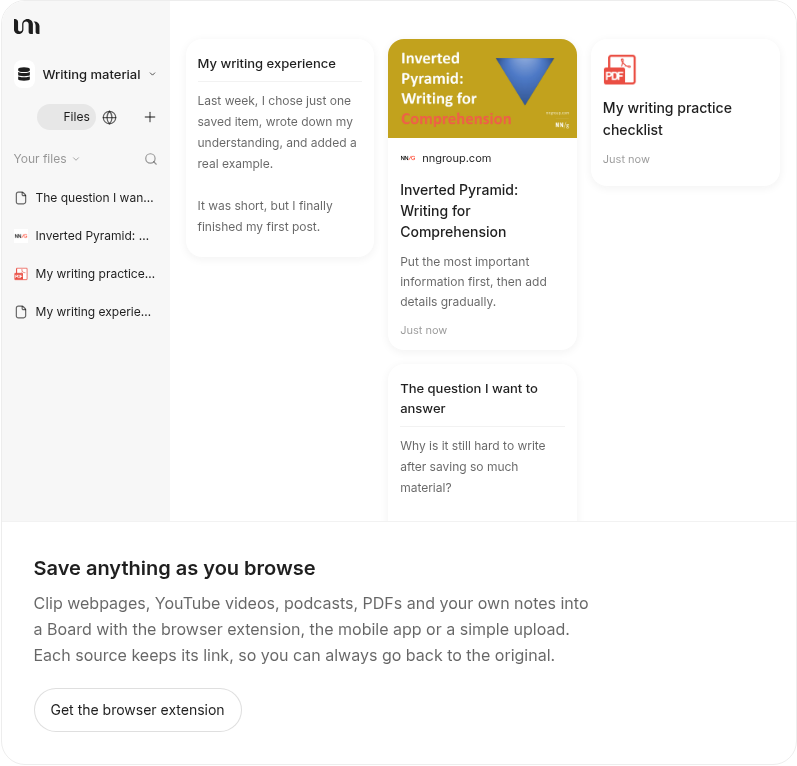
What is YouMind?
YouMind is an AI learning and creation workspace for researchers, writers, and creators. It brings source collection, AI-assisted research, and content creation together in Boards. Users can save web pages, YouTube videos, PDFs, and notes into a Board, then work with the selected materials using AI. This gives a project one place for its references and the work that grows from them.
With sources in a Board, users can ask questions, compare viewpoints, or develop a research brief based on the material they selected. When they are ready to create, they can turn research into articles, scripts, and other content. The official feature page also describes outputs such as slides, videos, and webpages.
Rather than separating a chat answer from the work itself, YouMind presents a workflow from learning and collecting through drafting and revision.
The workspace is intended for people who want to make something from the information they collect. Researchers can organize source material and explore their own reading; writers can keep references, notes, and drafts together; creators can develop content from the sources and ideas they have gathered. Boards can hold multiple kinds of material, including pages, videos, PDFs, and personal notes, which can be revisited as a project takes shape.
Boards also provide a continuing context for a project: users can return to saved sources, add notes, and keep their thinking near the draft. This is useful for work that develops over time, because reading and making are connected rather than treated as separate tasks. YouMind is positioned as a workspace for that process, not just as a one-off text generator.
YouMind’s official feature page describes collecting material through a browser extension, mobile app, or upload, with the source link kept for later reference. Drafts open as editable documents, and users can review proposed changes before accepting or rejecting them.
The feature page also describes saving a workflow as a Skill and reusing it on new material. Users remain in control of the sources they choose and should review AI-assisted writing before sharing or publishing it. Plan prices and quotas are not stated here; consult YouMind for current details.
What makes YouMind different
YouMind brings source collection and AI-assisted creation into the same workspace. Rather than treating research as a separate step from writing, a Board can hold webpages, YouTube videos, PDFs, notes, and related drafts together. Users can ask questions about selected materials, compare viewpoints, or develop a research brief before turning the result into an article, script, slide, video, or webpage. The official feature page says sources keep their original links, drafts are editable, and suggested changes can be accepted or rejected. This connected workflow is designed for researchers, writers, and creators who want to move from learning to making while staying close to the materials they chose.
How YouMind works
- 1
Save web pages, YouTube videos, PDFs, and notes into a Board using the browser extension, mobile app, or an upload.
- 2
Choose the materials to use, then ask questions, compare viewpoints, or request a brief based on selected sources.
- 3
Give YouMind a writing task and use the research to create an article, script, or other content; official examples include slides, videos, and webpages.
- 4
Open the draft as an editable document, revise it, and review suggested changes before accepting or rejecting them.
- 5
Save a workflow you like as a Skill and reuse it with new materials, or schedule it to run again.
Key features
YouMind use cases
Researchers can save web pages, YouTube videos, PDFs, and notes about a question in one Board, then ask AI to compare selected sources or develop a research brief. Keeping the references near the draft helps the researcher return to the original material while the project develops.
Writers can collect reference articles and personal notes in a Board, ask questions about those selected materials, and shape the research into an article or script. Drafts remain editable, so writers can refine the wording and review suggested changes rather than treating generated text as finished.
Creators can keep inspiration and reference material together, then use the saved sources to develop articles, scripts, slides, videos, webpages, or other content. YouMind's feature page describes a workflow from saved material to editable output, giving creators a place to revisit the inputs as they revise.
People who learn by reading and watching can save useful pages, YouTube videos, PDFs, and notes, explore the collection with AI, and turn their takeaways into something shareable. The workflow connects collecting, research, drafting, and revision without separating the source materials from the work they inform.
Pros & cons
- Stores source materials and AI-assisted drafts together in Boards for an end-to-end research-to-creation workflow.
- Works across webpages, YouTube videos, PDFs, and notes, keeping source links available for reference.
- Supports questions across selected sources and creation of editable articles, scripts, and other content.
- Offers outputs including slides, videos, and webpages, according to the official features page.
Who it's for
YouMind pricing
- Price and usage limits not provided
- check the official site for current plan details.
Plans and prices as listed on the YouMind website, last checked November 2026. Check their site for the latest pricing.
Frequently asked questions
What is YouMind?
YouMind is an AI learning and creation workspace for researchers, writers, and creators. It lets you save web pages, YouTube videos, PDFs, and notes in Boards, work with selected source materials using AI, and turn research into articles, scripts, and other content. Official feature materials also mention slides, videos, and webpages.
What kinds of material can I save?
You can save web pages, YouTube videos, PDFs, and your own notes into a Board. YouMind's official feature page says sources can be added with a browser extension, mobile app, or simple upload, and each source keeps its link so you can revisit the original. This lets the materials stay connected to the project built around them.
Can YouMind work with my saved sources?
Yes. The feature page says users can choose materials from a Board and ask questions, compare viewpoints, or turn them into a research brief. It describes answers as building on the selected sources rather than only on the open web. Users should still review the output against their source materials.
What can I create with YouMind?
YouMind helps turn research and saved materials into articles, scripts, and other content. Its feature page also shows slides, videos, and webpages as possible outputs. The particular result depends on the task and the materials you provide. Consult YouMind's official website for current product details and plan information.
Can I edit AI-generated work?
Drafts open as editable documents. The feature page says you can rewrite text yourself, ask AI to improve a selected paragraph, and review proposed changes before accepting or rejecting them. Earlier versions remain accessible according to the official page. As with any AI-assisted draft, review the finished text and its factual claims before publishing.
Is YouMind free?
YouMind has a free plan, with paid plans for heavier use. Check the YouMind website for current pricing.
What is YouMind used for?
Save research in Boards, then shape it into content with AI. YouMind is an AI learning and creation workspace for researchers, writers, and creators. It brings source collection, AI-assisted research, and content creation together in Boards. Users can save web pages, YouTube videos, PDFs, and notes into a Board, then work…
Who is YouMind for?
YouMind is built for Researchers, writers and creators.
What are the best alternatives to YouMind?
Similar tools in our directory include Creepless, GPT Plus – AI Subscription Top-up, TextLantern.
Similar AI Productivity Tools
 Creepless
Client work, kept inside the scope you agreed
Freemium GPT Plus – AI Subscription Top-up
One place to top up ChatGPT, Grok, Cursor and Gemini on your own account.
Paid TextLantern
Translate Discord privately or for your whole server
Freemium Offloop
AI-native Slack alternative for agent workspaces
Freemium Voxcribe
Online video and audio transcription with timestamps, TXT and SRT export
Free AI Signature Generator
Free online AI signature generator with 109 handwriting fonts
Free Gradebook Calculator
Free online gradebook calculator for weighted grades
Free Random Topic Generator
Free random topic generator for writing and debate
FreeHave a tool like YouMind? List it on AI SEO Gazette.
Free listings are reviewed by our editors. Featured is $15, one time.
 YouMind
Visit