


An AI content workflow splits one blog post into eight stages: idea, brief, outline, draft, human edit and fact-check, on-page SEO, publish and update. AI handles the fast, repeatable parts, such as clustering keywords, structuring a brief and drafting sections. A person owns the angle, the facts, first-hand examples and the final call to publish.
Key takeaways
- Orbit Media’s 2026 blogger survey puts the average post at 3 hours, 20 minutes, down from a 4 hour, 10 minute peak in 2022.
- Faster is not the same as better: in the same survey, the share of bloggers reporting strong results fell from 26% to 14% since 2022.
- Give AI the research and structure work. Keep the angle, the fact-check and the edit with a named person.
- Google asks you to fact-check AI output by hand, including titles, meta descriptions and image alt text.
- Write the brief before the prompt. A weak brief produces a generic draft no editor can save.
Why an AI content workflow matters now
Writing a blog post has been getting faster for four years running. Orbit Media’s 2026 blogging statistics, based on 1,042 content marketers, report an average of 3 hours, 20 minutes per post, down from a peak of 4 hours, 10 minutes in 2022. The same 2026 survey found 92.4% of respondents now use AI for blogging.
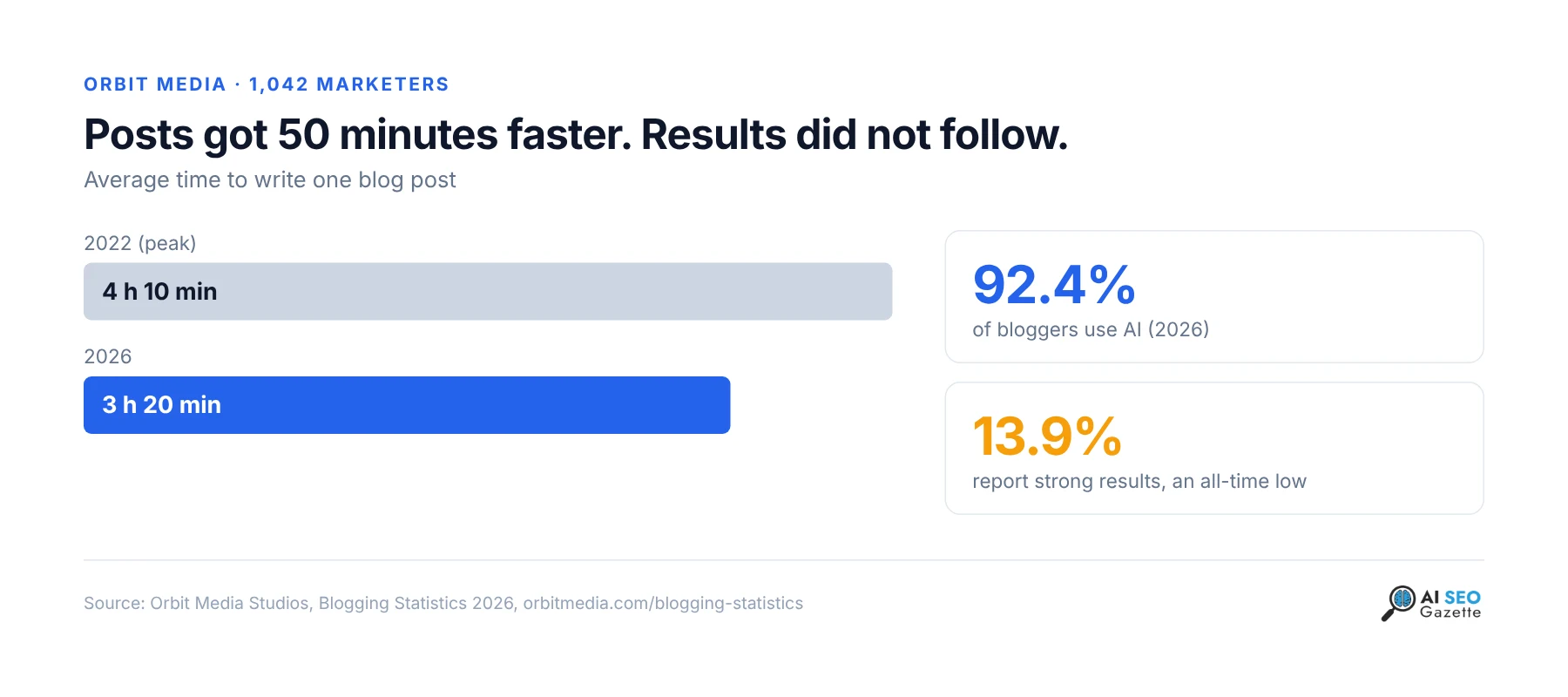
Here is the catch. Orbit found that AI use “correlates with nothing” when it comes to performance. Only 13.9% of respondents said their blog delivers strong results, an all-time low for the survey. Orbit’s read is that marketers dropped the habits that used to work, such as keyword research, original research and a formal editing process, while “replacing human editors with AI” rose.
So the time savings are real. What you do with the saved hour decides whether the post ranks. A good content creation workflow puts that hour back into research, editing and checking claims.
Google’s position points the same way. Its February 2023 guidance on AI-generated content says its systems reward “original, high-quality content” however it is produced, and that using automation “with the primary purpose of manipulating ranking in search results” breaks its spam policies.
The AI content process at a glance
Every stage below has an owner. The rule of thumb: AI proposes, data confirms, a person decides.
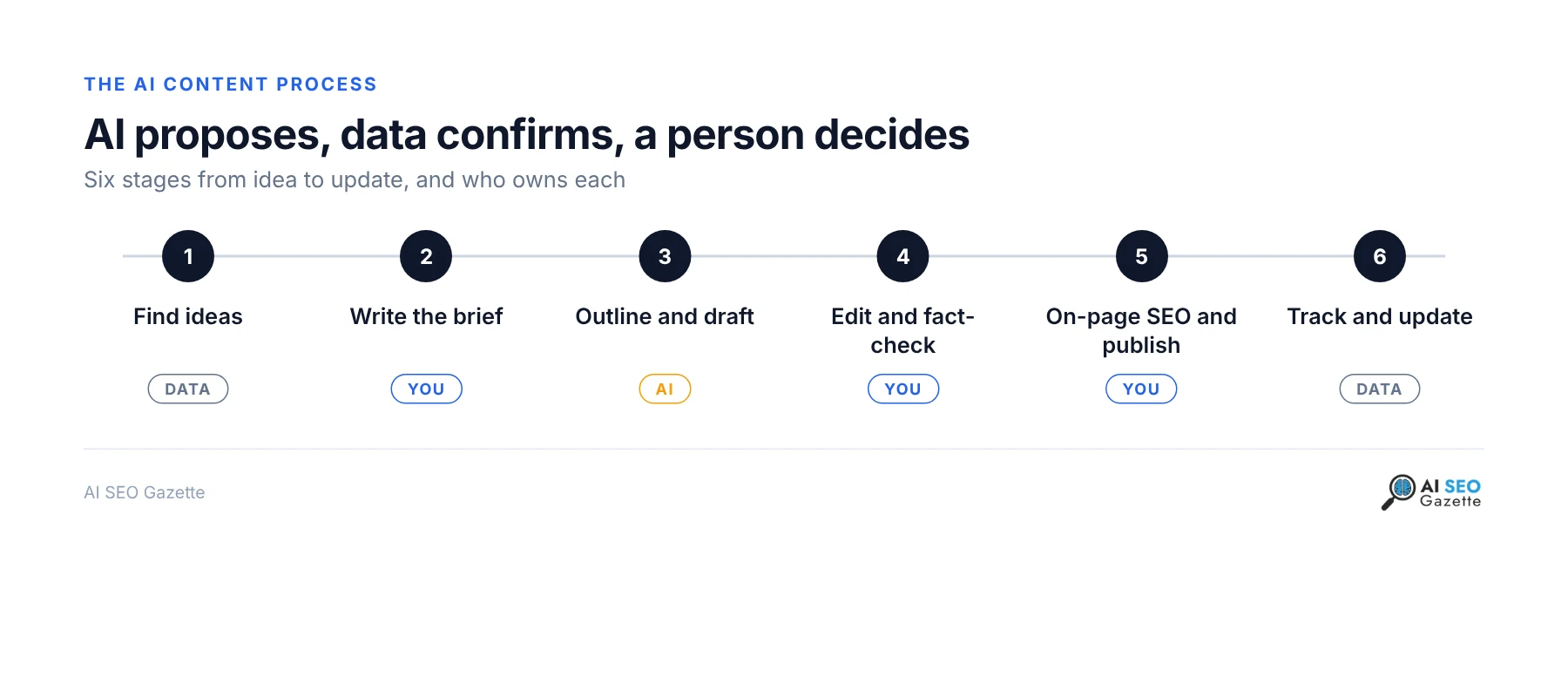
| Stage | You | AI | Data |
|---|---|---|---|
| Idea | Pick topics your site has a right to cover | Cluster keywords, suggest angles | Search Console queries, keyword tool volumes, People Also Ask |
| Brief | Set the angle, audience and must-include sources | Turn notes into a structured brief | Top-ranking pages, your own stats |
| Outline | Cut sections that repeat the SERP | Draft H2/H3 options | Questions people actually search |
| Draft | Write the intro, examples and opinions | Draft the explanatory sections | Verified facts pasted into the prompt |
| Edit and fact-check | Check every claim against its original source | Flag unsupported claims, tighten sentences | Primary sources only |
| SEO and on-page | Approve title, meta, links | Suggest title and meta variants | Internal link map, SERP titles |
| Publish and update | Set a review date, own the refresh | Compare the page to new SERP results | Clicks, impressions, position over time |
Step 1: Find ideas with data, then let AI cluster them
Start from demand you can see. Pull queries from Search Console, run seed terms through a keyword tool, and collect People Also Ask questions. A tool such as kwrds.ai pulls live PAA questions alongside volume and intent data, which gives the AI something real to work with.
Then ask AI to group the list by search intent and flag overlaps with pages you already have. That second check matters. If you skip it, you end up writing three posts that compete for one query. Our guide on using AI to find content gaps covers this stage in detail.
Step 2: Write a content brief that AI cannot fake
The brief is where most AI workflows fail. A one-line prompt like “write a post about X” returns the average of what already ranks. A brief gives the model your angle and your facts. If you prefer a tool for this stage, SEO Idea Creator turns a topic or URL into a content brief with keyword and competitor research, though its own listing notes that suggestions need human review.
Copy this template and fill the brackets yourself before any drafting starts:
You are helping me write a blog post. Do not write the post yet.
Topic: [working title]
Primary keyword: [keyword] | Secondary: [2 to 3 terms]
Reader: [who they are, what they already know]
Search intent: [what the searcher wants to do after reading]
Our angle: [the one thing we say that the top 5 results do not]
Verified facts to use (do not add others): [fact + source URL, one per line]
First-hand material: [our data, screenshots, test results, quotes]
Must not include: [claims we cannot back up, competitor names, etc.]
Task: Return an outline with H2s phrased as tasks, one line per
section on what it covers, and a list of claims that would need a
source. Flag any section that repeats what the top results already say.
The “verified facts only” line does a lot of work. It stops the model from filling gaps with numbers that sound right.
Step 3: Outline and draft section by section
Edit the outline before you draft. Delete any section that only restates the search results, and add the section only you can write: a test, a screenshot, a mistake you made.
Draft one section at a time, not the whole post in one prompt. Short prompts keep the model on the brief, and they make it obvious which paragraphs came from the AI and which came from you. Write the intro and the worked example yourself. Those are the parts readers and Google’s systems use to judge whether the page has first-hand experience.
Step 4: Edit and fact-check every claim by hand
This is the stage the Orbit data says people are cutting, and the one you should protect. Google’s guidance on using generative AI content is direct: “It is critical to manually factcheck and review all AI-generated content for accuracy and trustworthiness before publishing.” The same page extends that review to title elements, meta descriptions, structured data and image alt text.
For each number, open the original study, not a roundup that quotes it. Check the year, the sample and the exact wording. Then edit for voice: cut filler, vary sentence length, and replace generic examples with your own. Our guide to humanizing AI writing has an editing prompt for this pass. If you want a second pair of eyes, AI Humanize shows the original and the rewrite side by side, so you can accept changes line by line instead of pasting over your draft.
Detector scores are not an edit. If your team uses them, read our notes on using AI content detection tools fairly before acting on a score.
Step 5: Handle on-page SEO and publish
AI is useful here for drafting five title options and three meta descriptions to choose from. You still pick, and you still check that the title promises what the page delivers. Add internal links by hand from a list of your real URLs; models invent plausible slugs that return 404s.
Before you hit publish, run this checklist:
- Every statistic links to its original source and names the year.
- The intro answers the query in the first 60 words.
- At least one section contains material only your team could produce.
- Title, meta description and alt text were read by a person.
- Every internal and external link loads.
- A byline names the person accountable for the page.
- If AI played a large role, a short disclosure explains how.
That last point comes from Google’s helpful content guidance, which suggests AI or automation disclosures “for content where someone might think ‘How was this created?'” Our AI usage guidelines template includes disclosure rules your team can adopt.
Step 6: Schedule the update before you publish
Put a review date on the post the day it goes live. Stats age fast. When the date comes, check the post’s clicks and positions, compare it to what now ranks, and look for newer editions of every study you cite. Our AI-powered content audit checklist turns this into a repeatable routine, and the guide to fixing thin and outdated content covers what to do when a page has slipped.
Worked example: running this workflow on this article
We used the process above to produce the page you are reading, so here is what each check caught.
The brief’s stat was out of date. Our topic sheet said Orbit Media’s 2023 survey found the average post takes close to 4 hours (3 hours, 55 minutes). The fact-check found a newer edition. Orbit published its 2026 blogging statistics on September 8, 2026, with 1,042 respondents and an average of 3 hours, 20 minutes per post. We replaced the 2023 figure with the 2026 one.
Search snippets lagged behind the source. Search results still showed an older Orbit headline about a “12th Annual Blogger Survey” for 2025. Opening that URL took us to the 2026 report. If we had trusted the snippet, the article would have cited the wrong edition.
The quote needed the original page. We checked Google’s wording on fact-checking against the live Search Central page, not a summary of it, before quoting it in Step 4.
Tool links needed screening. Our tool sitemaps list 566 tool pages. We shortlisted 16 by name and description, opened each listing, and kept three that fit a specific stage: keyword ideas, briefs and editing. The rest were image, video or monitoring tools that do not belong in a writing workflow.
None of those checks took long. Each one would have put a wrong fact or a weak link on the page if we had let the AI draft go straight to publish.
Where AI gets the content workflow wrong
It invents sources that look real
Models produce citations with real publisher names and believable URLs that do not exist, or that exist but say something else. Open every link.
It reports old numbers as current
Training data has a cutoff, and search summaries lag. Ask for the year of every stat, then confirm the latest edition yourself.
It writes the average of the SERP
Without an angle in the brief, the draft repeats the top five results. Google’s helpful content guidance asks whether a page offers “original information, reporting, research, or analysis.” A rewritten consensus does not.
It scales the mistake
One weak template run across 200 pages is a bigger problem than one weak post. Google’s spam policies list “using generative AI tools or other similar tools to generate many pages without adding value for users” as an example of scaled content abuse. Our piece on AI content ethics covers where the line sits for disclosure and authorship.
It skips the update
AI will not tell you a post went stale. The review date in Step 6 is the only thing that will.
Frequently asked questions
Does Google penalize AI-written content?
Not for being AI-written. Google’s 2023 guidance says it rewards original, high-quality content however it is produced. What breaks its spam policies is using automation mainly to manipulate rankings, or generating many pages that add no value for users.
How much time does an AI content workflow save?
Orbit Media’s 2026 survey found the average post now takes 3 hours, 20 minutes, 50 minutes less than the 2022 peak of 4 hours, 10 minutes, with 92.4% of respondents using AI. Your savings depend on how much research and editing you keep, and you should keep most of it.
Which stages of the content creation workflow should stay human?
The angle, first-hand examples, the fact-check and the final decision to publish. AI can draft, structure and suggest, but a named person should be accountable for every claim on the page.
Do I need to disclose AI use on my blog?
Google’s helpful content guidance suggests a disclosure where readers might reasonably ask how a piece was created. A short note on how AI was used, plus an accurate byline, covers most cases.
Should I run AI drafts through an AI detector?
A detector score tells you little about quality or accuracy. Spend that time checking sources and adding original material instead.
Sources
- Orbit Media Studios, “Blogging Statistics 2026: What 1,042 Content Marketers Told Us About What Works,” https://www.orbitmedia.com/blogging-statistics/
- Google Search Central, “Google Search’s guidance on using generative AI content on your website,” https://developers.google.com/search/docs/fundamentals/using-gen-ai-content
- Google Search Central, “Creating helpful, reliable, people-first content,” https://developers.google.com/search/docs/fundamentals/creating-helpful-content
- Google Search Central, “Spam policies for Google web search,” https://developers.google.com/search/docs/essentials/spam-policies
- Google Search Central Blog, “Google Search’s guidance about AI-generated content” (February 8, 2023), https://developers.google.com/search/blog/2023/02/google-search-and-ai-content