

To make blog illustrations with an AI image generator, write a one-page style guide first (palette, line style, aspect ratio, banned elements), reuse one prompt template for every post, generate several drafts, then finish the best one in an editor: fix any text, match brand colors, add your own layout, compress the file and write alt text.
Below: how to pick an ai image generator for blog work, a prompt template you can copy, a worked example on one of our own posts, and the edits that give you something you can call yours under US copyright rules.
Key takeaways
- Consistency comes from a written style guide and a fixed prompt template, not from the tool.
- Ask the generator for no text at all, then add headlines and labels yourself in an editor.
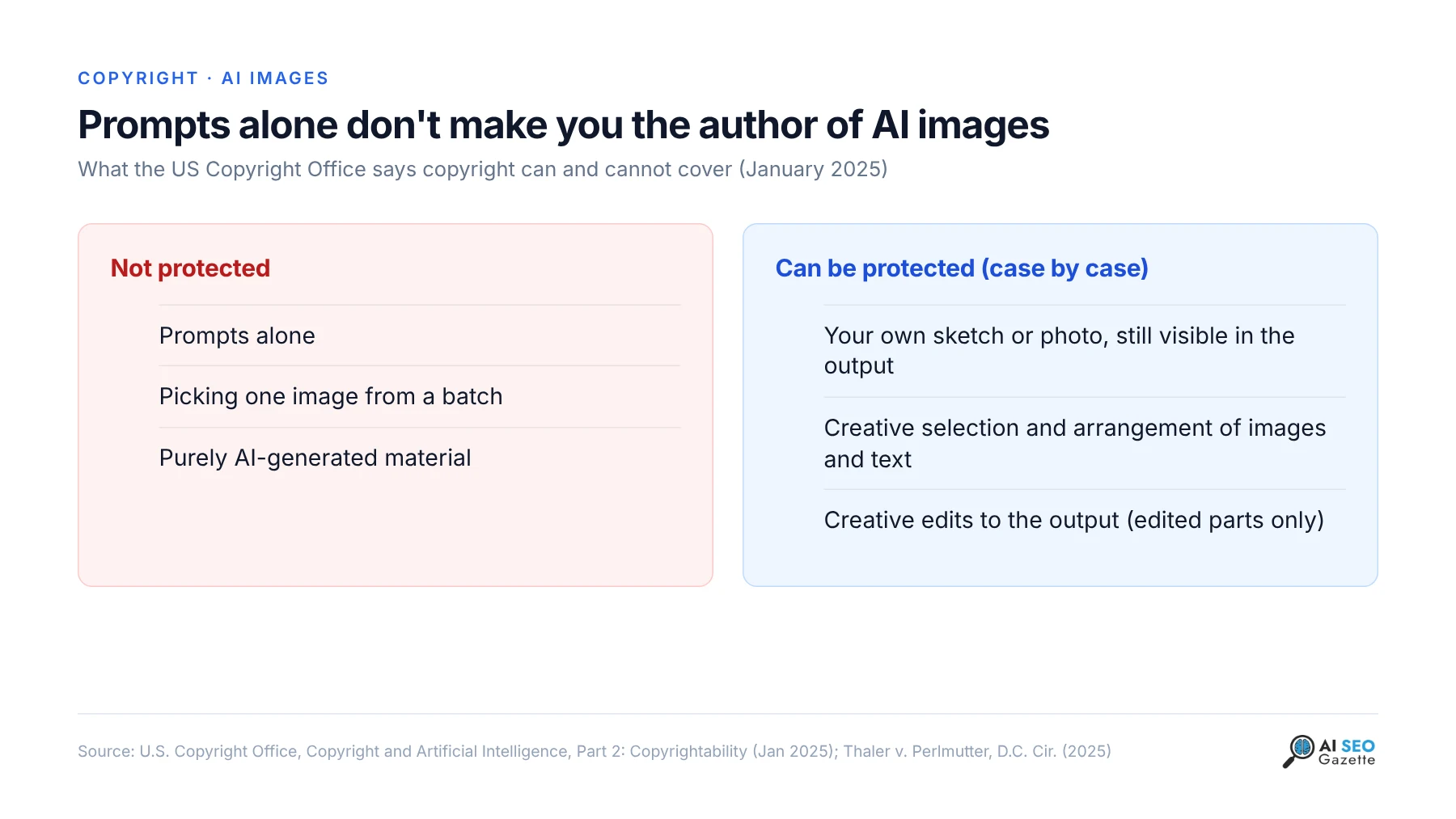
- The US Copyright Office said in January 2025 that prompts alone do not make you the author of the output.
- Your own sketch as input, your layout and your real edits are the parts copyright can cover.
- Every image still needs a human check for hands, colors, file size and alt text before it goes live.
Who owns an AI blog illustration?
No one holds copyright in it if all you did was type a prompt and pick a result. In its Part 2 report on copyrightability (January 2025), the US Copyright Office concluded that “prompts alone do not provide sufficient human control to make users of an AI system the authors of the output.” The same report says that choosing one image from a batch of options is not a creative act either.
The courts agree on the basic rule. In Thaler v. Perlmutter (decided March 18, 2025), the DC Circuit upheld the refusal to register a picture listed as made by an AI system, holding that the Copyright Act requires a human author. The Supreme Court denied review on March 2, 2026. The same opinion is clear that the rule “does not prohibit copyrighting work that was made by or with the assistance of artificial intelligence,” as long as a human is the author.
For a blogger, this means copyright will not stop a competitor from reusing a raw AI image. What you add on top is where your protection lives.
How to choose an ai image generator for blog illustrations
Blog illustration needs the same look across dozens of posts, shapes that read at thumbnail size and space for a headline. Test each tool against the jobs below with your own prompt before you pay.
| Your job | What to test | Where to start on the Gazette |
|---|---|---|
| Same style across every post | Run one prompt five times. Do line weight and palette hold? | AI image generators directory |
| Images with words in them | Ask for a three-word label and zoom in on the letters | Ideogram 4.5 listing (built around legible in-image text) |
| Fixing garbled text after generation | Replace one wrong word without redrawing the scene | Edit Text in Image listing |
| Alt text and descriptions | Compare the tool’s draft with what the image is for in the post | Image Describer listing |
| Page weight | Compress and compare at 100% zoom | Free Image Compressor listing |
Read each tool’s license terms before commercial use, since they differ and change. If you are still building your wider toolkit, our AI tools stack for solo bloggers covers where image tools fit next to writing and SEO tools.
Write a style guide before your first prompt
Style drift is the usual problem with ai blog images. Post one gets flat vector art, post two comes back glossy and 3D. The fix is boring: decide the look once and write it down.
Keep it to six lines:
- Medium: flat vector, isometric, paper cut, line drawing. Pick one.
- Palette: three to four hex codes from your brand, plus one background color.
- Line and shape: outline weight, rounded or sharp corners, gradients or none.
- Framing: aspect ratio for featured images and for in-body images.
- Empty space: where the headline or label will go, so the AI leaves it clear.
- Never include: text, logos, watermarks, realistic faces, hands if your tool struggles with them.
Paste the guide into your team’s AI policy too. If you do not have one, our guide to setting AI usage guidelines for a content team has a template where image rules can slot in.
Copy-paste prompt template for ai blog images
Fill the curly brackets per post and leave everything else fixed. The fixed lines carry your style guide, so every image starts from the same base. The same structure ideas from our prompt engineering basics for SEO apply here: one job per line, concrete nouns, explicit exclusions.
Subject: {one concrete scene that shows the post's main idea}
Style: flat vector editorial illustration, clean even outlines, no gradients, no photorealism
Palette: {color 1 hex}, {color 2 hex}, {color 3 hex} on a {background color} background
Composition: {aspect ratio}, main subject {left or right} of center, empty area on the {other side} for a headline added later
Exclude: any text, letters, numbers, logos, watermarks, human hands
Mood: calm, practical, editorial
Two tips. Describe one scene, not a list of objects; a list tends to produce a cluttered collage. And treat hex codes as a request, not a guarantee. Plenty of generators shift colors, which is why color matching sits in the edit step below.
The workflow from brief to published image
This is the routine that keeps an ai illustration generator fast without letting it make the decisions.
- Brief. Read the post’s direct answer and pick the single idea the image should carry.
- Sketch (optional, worth it). Draw a rough layout on paper or in any drawing app. If your tool accepts an image reference, feed the sketch in.
- Prompt. Fill the template. Generate four to eight drafts.
- Pick and edit. Choose the draft with the best composition, not the best details. Fix colors, remove artifacts, add your own labels and headline in an editor.
- Export. Save as WebP or AVIF at the size your theme displays, and compress it.
- Publish. Write a descriptive file name, alt text and a caption. Keep the layered source file.

Step two matters more than it looks. The Copyright Office’s 2025 report says human authors are entitled to copyright in their own expressive inputs that remain “perceptible in AI-generated outputs.” Your sketch, if it survives into the final image, is your work. The image step slots into a broader editorial process, which we lay out in how to build an AI-assisted content workflow.
Worked example: an illustration plan for our AEO checklist
Here is the template applied to a real Gazette post, our AEO checklist for getting cited in AI Overviews, ChatGPT and Perplexity. This is the brief we would hand to a generator. We are not reporting test results, only showing how the decisions get made.
Brief. The post splits its checklist into three groups: on-page, technical and off-site. So the image idea is three stacked checklist cards feeding into one AI answer bubble.
Palette. The Gazette’s site styles use navy #0F172A, blue #2563EB and light gray #E2E8F0, so those go in the prompt.
Subject: three stacked checklist cards with tick marks, connected by a single arrow to a speech bubble that holds a small search icon
Style: flat vector editorial illustration, clean even outlines, no gradients, no photorealism
Palette: #0F172A, #2563EB, #E2E8F0 on a white background
Composition: 16:9, cards on the left third, bubble on the right, empty band across the top for a headline added later
Exclude: any text, letters, numbers, logos, watermarks, human hands
Mood: calm, practical, editorial
Edit plan. In the editor, type the labels “On-page”, “Technical” and “Off-site” onto the three cards ourselves instead of asking the AI to spell them. Recolor anything that drifted from the three hex codes. Add the headline in the top band in the site font. Those additions are our own selection and arrangement of text and visual elements, the kind of contribution the Copyright Office has accepted in past registrations.
Alt text. “Three checklist cards labeled on-page, technical and off-site leading to an AI answer bubble.” It describes what is shown and why it is on the page, without stuffing keywords.
How much editing makes an AI illustration yours?
There is no fixed percentage. The Copyright Office’s registration guidance (March 2023) says a person may “modify material originally generated by AI technology to such a degree that the modifications meet the standard for copyright protection,” and that protection then covers only the human-authored parts. The AI-generated base stays unprotected. The 2025 report repeats that each case is judged on its own facts.
For blog illustrations, these habits put you on firmer ground:
- Start from your own sketch, photo or diagram when the tool allows it.
- Build the final layout yourself: labels, headline, arrows, cropping and how elements sit together.
- Make real changes, such as redrawn shapes or added elements, rather than a color tweak.
- Save layered files and notes on what you changed. If you ever register, the guidance says you must disclose AI-generated content that is more than de minimis and describe your own contribution.
This is US law and general information, not legal advice. For when to tell readers an image is AI-made, see our AI content ethics guide for bloggers and SEOs. For the SEO side, including IPTC labeling, read how to use AI images safely in SEO content.
Where an ai illustration generator gets it wrong
Every draft needs a human pass. These are the misses we see most often.
- Garbled text. Letters that look right at a glance but spell nothing. Add text yourself or fix it with a text editing tool.
- Hands and small objects. Extra fingers, melted keyboards, charts with impossible axes. Crop, redraw or regenerate the region.
- Style drift. Compare the new image side by side with your last three posts before you publish.
- Brand colors. Use an eyedropper and check the hex values against your style guide.
- Accidental lookalikes. Logos, mascots or characters that resemble a real brand. Remove them.
- Alt text. Google’s image SEO documentation calls alt text the most important attribute for image metadata and warns against keyword stuffing. Describe the image in context.
- File size and format. The same Google page notes images are often the largest contributor to page size and lists supported formats including WebP, AVIF, PNG, JPEG and SVG.
- Mass production. Google’s guidance on generative AI content warns that generating many pages without adding value can violate its scaled content abuse policy. An AI image on a thin post does not fix the post.
Pre-publish checklist
- ☐ Image carries one idea from the post’s direct answer
- ☐ Style matches the written guide and the last three posts
- ☐ No AI-generated text left in the image; all words added by a human
- ☐ Colors checked against brand hex codes
- ☐ No hands, faces or objects with visible errors
- ☐ No marks that resemble a real logo or character
- ☐ Exported as WebP or AVIF at display size and compressed
- ☐ Descriptive file name, alt text and caption written
- ☐ Layered source file and edit notes saved
Frequently asked questions
Can I copyright an image I made with an AI image generator?
Not the raw output. The US Copyright Office said in its January 2025 report that prompts alone do not make you the author. You can claim the parts you add yourself, such as your own sketch, creative edits, or the selection and arrangement of text and images, judged case by case.
Will AI-generated blog images hurt my rankings?
Google’s guidance on generative AI content focuses on whether pages add value for users, not on how an image was made. Its image SEO documentation asks for descriptive alt text, relevant placement near related text and fast-loading files. Treat AI images like any other image on those points.
How do I keep the same style across all my blog illustrations?
Write a short style guide with medium, hex palette, line style, aspect ratio and banned elements, and paste those lines into every prompt unchanged. Compare each new image with your last few posts before you publish.
Should I let the AI add the post title inside the image?
Usually no. Even tools built for in-image text can misspell words. Ask for an empty area in the prompt and add the headline yourself in an editor, which also counts as your own layout work.
Do I need to label AI images on my blog?
There is no single rule for all blogs. Google asks Merchant Center sellers to tag AI-generated product images with IPTC metadata, and our AI content ethics guide covers when a reader-facing disclosure makes sense.
Sources
- U.S. Copyright Office, “Copyright and Artificial Intelligence, Part 2: Copyrightability” (January 2025): copyright.gov
- U.S. Copyright Office, “Copyright Registration Guidance: Works Containing Material Generated by Artificial Intelligence,” 88 Fed. Reg. 16190 (March 16, 2023): copyright.gov
- U.S. Court of Appeals for the D.C. Circuit, Thaler v. Perlmutter, No. 23-5233 (March 18, 2025): cadc.uscourts.gov
- Supreme Court of the United States, Docket No. 25-449, Thaler v. Perlmutter (petition denied March 2, 2026): supremecourt.gov
- Google Search Central, “Image SEO best practices”: developers.google.com
- Google Search Central, “Google Search’s guidance on generative AI content on your website”: developers.google.com